concept content in category d3

This is an excerpt from Manning's book D3.js in Action, Second Edition: Data visualization with JavaScript.

d3.select("div").style("background", "lightblue").style("border", "solid
black 1px").html("You have now dynamically changed the content of a web page
element");
A web page is structured according to the DOM. You need a passing familiarity with the DOM to do web development, so we’ll take a quick look at DOM elements and structure in a simple web page in your browser and touch on the basics of the DOM. To get started, you’ll need a web server that you can access from the computer that you’re using to code. With that in place, you can download the D3 library from d3js.org (d3.js or d3.min.js for the minified version) and place that in the directory where you’ll make your web page. You’ll create a page called d3ia.html in the text editor with the contents in the following listing.
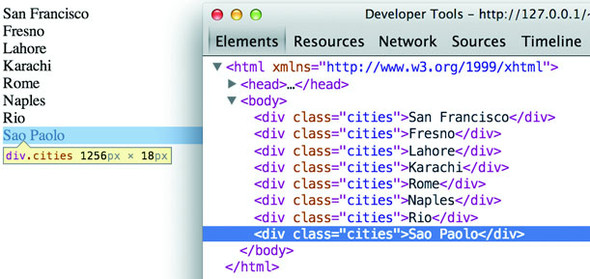
You use selections to make changes to the structure and appearance of your web page with D3. Remember that a selection consists of one or more elements in the DOM as well as the data, if any, associated with them. You can also create or delete elements using selections, and change the style and content. You’ve seen how to use d3.select() to change a DOM element, and now we’ll focus on creating and removing elements based on data. For this example, we’ll use cities.csv as our data source. In it are a list of all the cities I’ve lived or always wanted to visit, and Fresno. Later we’ll put these cities on a map, but for now we’re going to use them as non-map data. First, we need to load cities.csv and trigger our data visualization function in the callback to create a set of new <div> elements on the page using this code, with the results shown in figure 2.11.