concept toString() in category dart

This is an excerpt from Manning's book Dart in Action.
Strings are used in many places throughout web applications. Dart provides a number of ways for you to convert expressions into strings, either via the toString() function that’s built into the base Object class or by using string interpolation.
We’ll explore the base Object class from which all other classes and types inherit, including strings, numbers, Boolean values, null, and your own custom classes. Object provides some standard methods and properties that you can override in your own classes, such as the toString() method. We’ll also look at the dynamic type, which Dart uses to enable optional typing.
The Object type provides a small number of methods and properties that all classes can use. The most commonly used one is the toString() method, which provides a string representation of the instance.
When you try to use an instance of any class as a string—for example, by passing it into Dart’s top-level print() function—the toString() method of Object gets called. The example in the following listing explicitly calls the toString() function, but if you don’t explicitly call toString(), Dart will call it implicitly.
Calling toString() on an Object is interesting. It outputs the text Instance of 'Object', which is as descriptive as it can be at that point. If you were to call toString() on an instance of User, you’d get the message Instance of 'User' because your class is using the functionality built into the Object class. If you called toString() on a different class, such as a list of numbers, the list of numbers would be printed rather than the text Instance of 'List' because the List class provides its own toString() method, which overrides the functionality provided by Object.
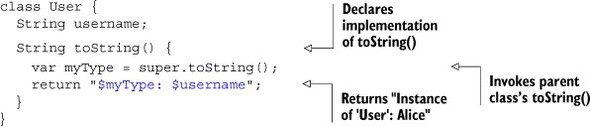
You can override this functionality in your own classes, too, by adding a toString() function to your class definition. For example, you can make your User class output the name of the user rather than use the default functionality provided by Object.toString(). Doing so provides a benefit if you add logging functionality, because you can pass the user instance into your logging function or the top-level print() function and get back a descriptive message. The next listing shows an example implementation that also uses the original functionality found in Object by explicitly calling super.toString().
Subclasses of User, such as EnterpriseUser, also inherit this functionality if they don’t override it themselves. Calling toString() on an instance of the EnterpriseUser class will result in the output Instance of 'EnterpriseUser': Alice, which is far more informative than the default. Of course, you could always override toString() again in the EnterpriseUser class definition.