concept file in category dask
This is an excerpt from Manning's book Data Science with Python and Dask.
The other interesting pieces of information about the DataFrame’s metadata give us insight into how Dask’s scheduler is deciding to break up the work of processing this file. The
npartitionsvalue shows how many partitions the DataFrame is split into. Since the 2017 file is slightly over 2 GB in size, at 33 partitions, each partition is roughly 64 MB in size. That means that instead of loading the entire file into RAM all at once, each Dask worker thread will work on processing the file one 64 MB chunk at a time.Figure 2.3 Dask splits large data files into multiple partitions and works on one partition at a time.

Figure 2.3 demonstrates this behavior. Rather than eagerly loading the entire DataFrame into RAM, Dask breaks the file into smaller chunks that can be worked on independently. These chunks are called partitions. In the case of Dask DataFrames, each partition is a relatively small Pandas DataFrame. In the example in figure 2.3, the DataFrame consists of two partitions. Therefore, the single Dask DataFrame is made up of two smaller Pandas DataFrames. Each partition can be loaded into memory and worked on one at a time or in parallel. In this case, the worker node first picks up partition 1 and processes it, and saves the result in a temporary holding space. Next it picks up partition 2 and processes it, saving the result to a temporary holding space. Finally, it combines the results and ships it down to our client, which displays the result. Because the worker node can work on smaller pieces of the data at a time, work can be distributed out to many machines. Or, in the case of a local cluster, work can proceed on very large datasets without resulting in out-of-memory errors.
This particular dataset is a plain text file. You can open it with any text editor and start to make sense of the layout of the file. The Bag API offers a few convenience methods for reading text files. In addition to plain text, the Bag API is also equipped to read files in the Apache Avro format, which is a popular binary format for JSON data and is usually denoted by a file ending in .avro. The function used to read plain text files is
read_text, and has only a few parameters. In its simplest form, all it needs is a filename. If you want to read multiple files into one Bag, you can alternatively pass a list of filenames or a string with a wildcard (such as *.txt). In this instance, all the files in the list of filenames should have the same kind of information; for example, log data collected over time where one file represents a single day of logged events. Theread_textfunction also natively supports most compression schemes (such as GZip and BZip), so you can leave the data compressed on disk. Leaving your data compressed can, in some cases, offer significant performance gains by reducing the load on your machine’s input/output subsystem, so it’s generally a good idea. Let’s take a look at what theread_textfunction will produce.Listing 9.1 Reading text data into a Bag
import dask.bag as bag
import os

os.chdir('/Users/jesse/Documents')
raw_data = bag.read_text('foods.txt')
raw_data

# Produces the following output:
# dask.bag<bag-fro..., npartitions=1>
As you’ve probably come to expect by now, the
read_textoperation produces a lazy object that won’t get evaluated until we actually perform a compute-type operation on it. The Bag’s metadata indicates that it will read the entire data in as one partition. Since the size of this file is rather small, that’s probably OK. However, if we wanted to manually increase parallelism,read_textalso takes an optionalblocksizeparameter that allows you to specify how large each partition should be in bytes. For instance, to split the roughly 400 MB file into four partitions, we could specify a blocksize of 100,000,000 bytes, which equates to 100 MB. This will cause Dask to divide the file into four partitions.
The
countfunction, which looks exactly like thecountfunction from the DataFrame API, fails with a UnicodeDecodeError exception. This tells us that the file is probably not encoded in UTF-8 since it can’t be parsed. These issues typically arise if the text uses any kind of characters that aren’t used in the English alphabet (such as accent marks, Hanzi, Hiragana, and Abjads). If you are able to ask the producer of the file which encoding was used, you can simply add the encoding to theread_textfunction using theencodingparameter. If you’re not able to find out the encoding that the file was saved in, a bit of trial and error is necessary to determine which encoding to use. A good place to start is trying thecp1252encoding, which is the standard encoding used by Windows. In fact, this example dataset was encoded usingcp1252, so we can modify theread_textfunction to usecp1252and try ourcountoperation again.Listing 9.4 Changing the encoding of the
read_textfunctionraw_data = bag.read_text('foods.txt', encoding='cp1252') raw_data.count().compute() # Produces the following output: # 5116093
With the encoding problem solved, let’s look at how we can add the structure we need to group the attributes of each review together. Since the file we’re working with is just one long string of text data, we can look for patterns in the text that might be useful for dividing the text into logical chunks. Figure 9.3 shows a few hints as to where some useful patterns in the text are.
Figure 9.3 A pattern enables us to split the text into individual reviews.
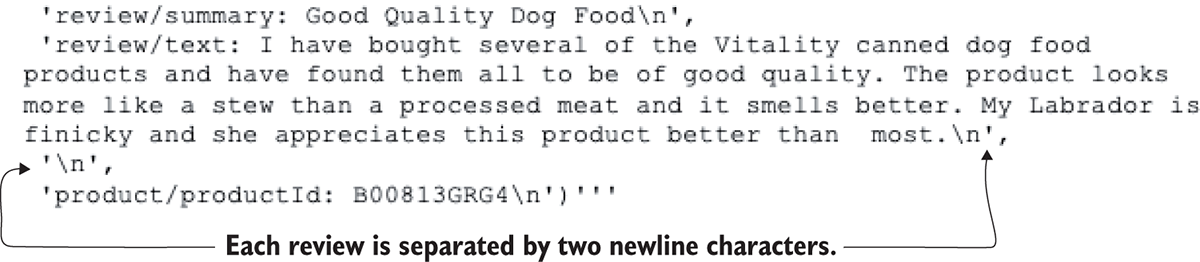
In this particular example, the author of the dataset has put two newline characters (which show up as
\n) between each review. We can use this pattern as a delimiter to split the text into chunks, where each chunk of text contains all attributes of the review, such as the product ID, the rating, the review text, and so on. We will need to manually parse the text file using some functions from the Python standard library. What we want to avoid doing, however, is reading the entire file into memory in order to do this. Although this file could comfortably fit into memory, an example that reads the entire file into memory would not work once you start working with datasets that exceed the limits of your machine (and it would defeat the whole purpose of parallelism to boot!). Therefore, we will use Python’s file iterator to stream the file a small chunk at a time, search the text in the buffer for our desired delimiter, mark the position in the file where a review starts and ends, and then advance the buffer to find the position of the next review. We’ll end up with a list of Delayed objects that have pointers to the start and end of each review, which can further be parsed into a dictionary of key-value pairs. The full process from start to finish is outlined in the flowchart in figure 9.4.Figure 9.4 Our custom text-parsing algorithm to implement using Dask Delayed
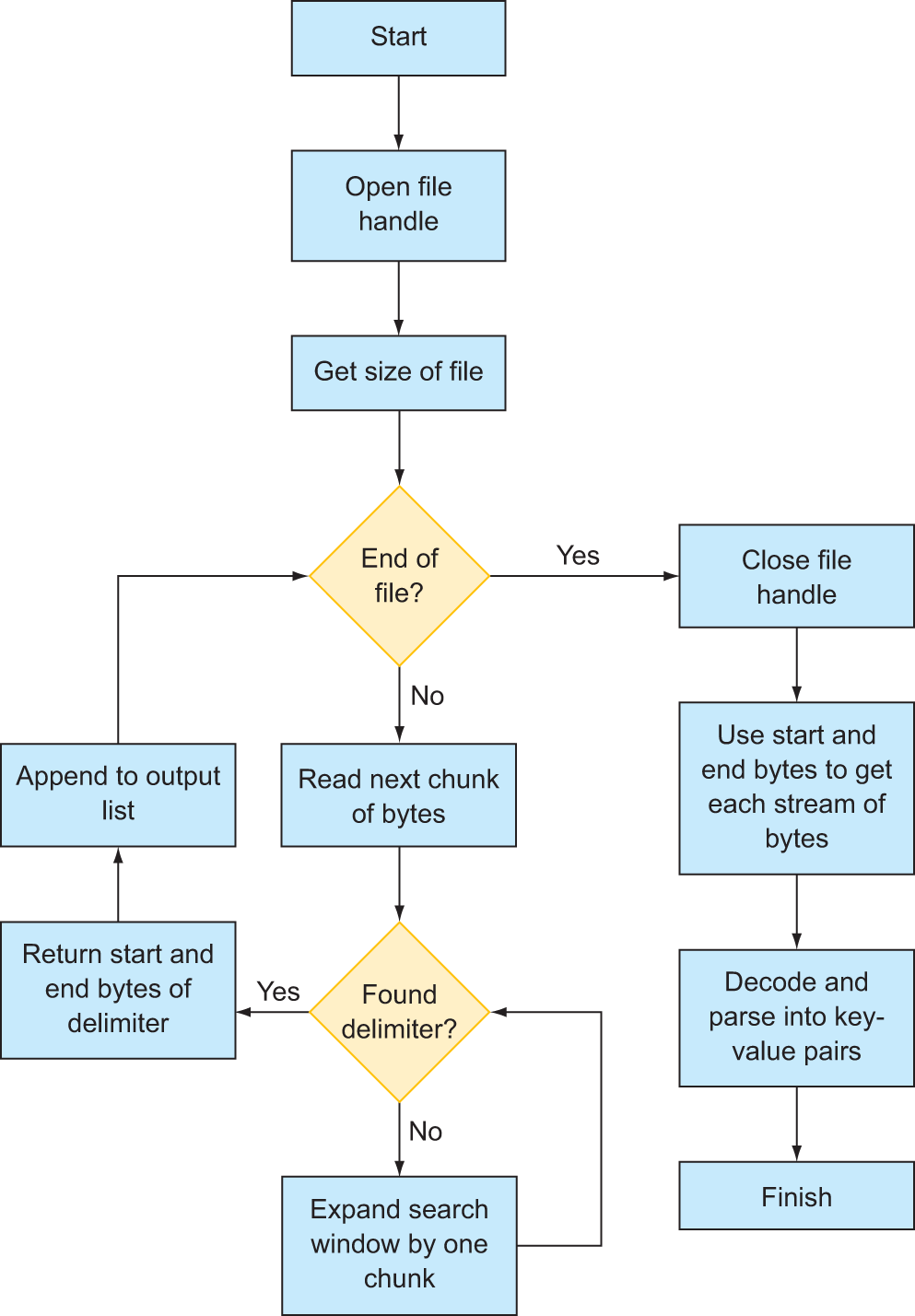
First, we’ll define a function that searches a part of a file for our specified delimiter. With Python’s file handle system, it’s possible to stream data in from a file starting at a specific byte number and stopping at a specific byte number. For instance, the beginning of the file is byte 0. The next character is byte 1, and so forth. Rather than load the whole file into memory, we can load chunks in at a time. For instance, we could load 1000 bytes of data starting at byte 5000. The space in memory we’re loading the 1000 bytes of data into is called a buffer. We can decode the buffer from raw bytes to a string object, and then use all the string manipulation functions available to us in Python, such as
find,strip,split, and so on. And, since the buffer space is only 1000 bytes in this example, that’s approximately all the memory we will use.