concept review in category dask
This is an excerpt from Manning's book Data Science with Python and Dask.
Listing 9.2 Viewing items in a Bag
raw_data.take(10)

# Produces the following output:
'''('product/productId: B001E4KFG0\n',
 'review/userId: A3SGXH7AUHU8GW\n',
 'review/profileName: delmartian\n',
 'review/helpfulness: 1/1\n',
 'review/score: 5.0\n',
 'review/time: 1303862400\n',
 'review/summary: Good Quality Dog Food\n',
 'review/text: I have bought several of the Vitality canned dog food products and have found them all to be of good quality. The product looks more like a stew than a processed meat and it smells better. My Labrador is finicky and she appreciates this product better than  most.\n',
 '\n',
 'product/productId: B00813GRG4\n')'''
However, we also need to cope with the possibility that a review is longer than our buffer size, which will result in the delimiter not being found.
Now that we have a list containing all the byte positions of the reviews, we need to create some instructions to transform the list of addresses into a list of actual reviews. To do that, we’ll need to create a function that takes a starting position and a number of bytes as input, reads the file at the specified byte location, and returns a parsed review object. Because there are thousands of reviews to be parsed, we can speed up this process using Dask. Figure 9.6 demonstrates how we can divide up the work across multiple workers.
Figure 9.6 Mapping the parsing code to the review data
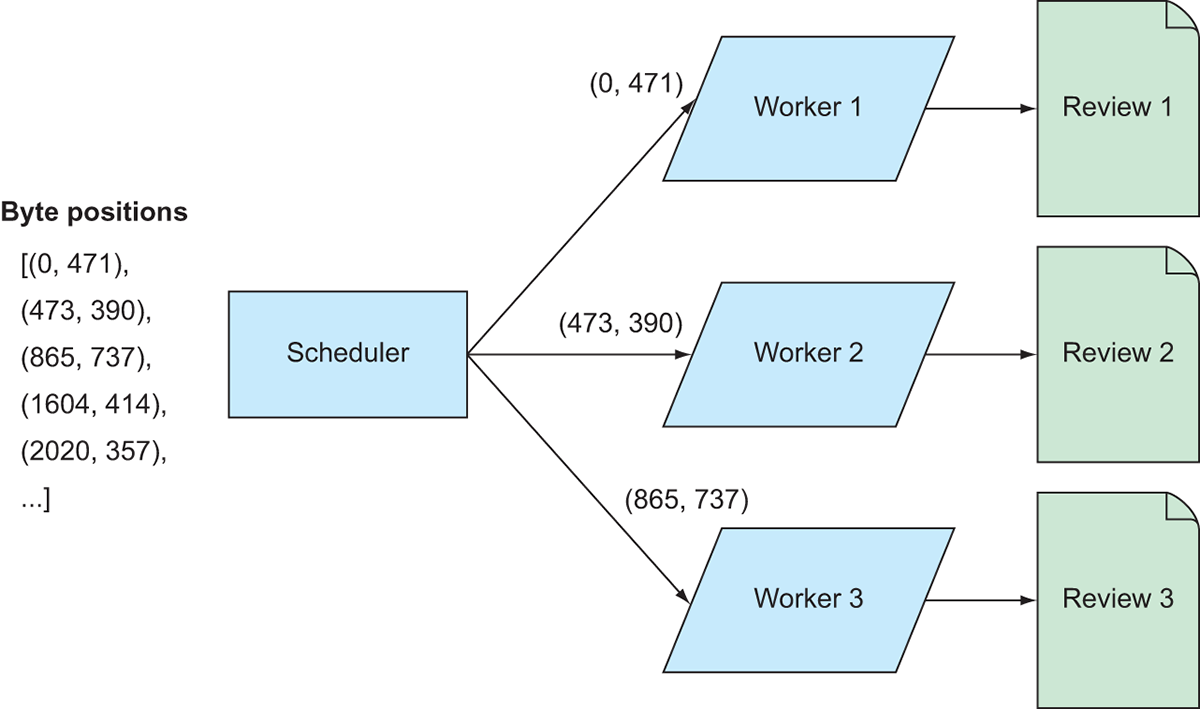
Effectively, the list of addresses will be divided up among the workers; each worker will open the file and parse the reviews at the byte positions it receives. Since the reviews are stored as JSON, we will create a dictionary object for each review to store its attributes. Each attribute of the review looks something like this:
'review/userId: A3SGXH7AUHU8GW\n', so we can exploit the pattern of each key ending in ': ' to split the data into key-value pairs for the dictionaries. The next listing shows a function that will do that.