concept text in category dask
This is an excerpt from Manning's book Data Science with Python and Dask.
Text qualifiers are yet another type of special character used to denote that the contents of the column is a text string. They can be very useful in instances where the actual data is allowed to contain characters that are also being used as row or column delimiters. This is a fairly common issue when working with CSV files that contain text data, because commas normally show up in text. Surrounding these columns with text qualifiers indicates that any instances of the column or row delimiters inside the text qualifiers should be ignored.
The
countfunction, which looks exactly like thecountfunction from the DataFrame API, fails with a UnicodeDecodeError exception. This tells us that the file is probably not encoded in UTF-8 since it can’t be parsed. These issues typically arise if the text uses any kind of characters that aren’t used in the English alphabet (such as accent marks, Hanzi, Hiragana, and Abjads). If you are able to ask the producer of the file which encoding was used, you can simply add the encoding to theread_textfunction using theencodingparameter. If you’re not able to find out the encoding that the file was saved in, a bit of trial and error is necessary to determine which encoding to use. A good place to start is trying thecp1252encoding, which is the standard encoding used by Windows. In fact, this example dataset was encoded usingcp1252, so we can modify theread_textfunction to usecp1252and try ourcountoperation again.
With the encoding problem solved, let’s look at how we can add the structure we need to group the attributes of each review together. Since the file we’re working with is just one long string of text data, we can look for patterns in the text that might be useful for dividing the text into logical chunks. Figure 9.3 shows a few hints as to where some useful patterns in the text are.
Figure 9.3 A pattern enables us to split the text into individual reviews.
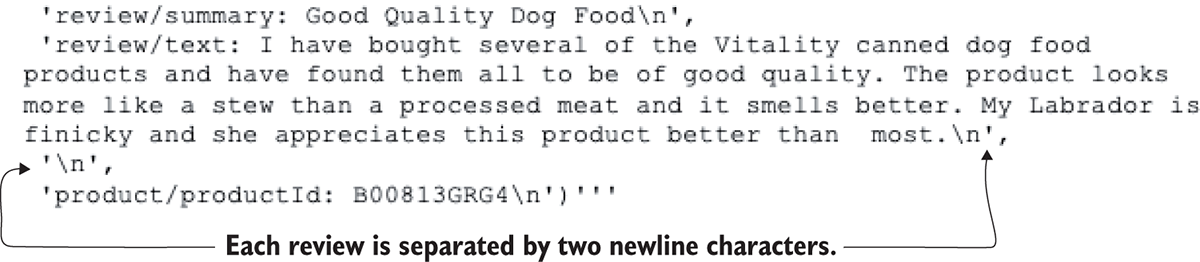
In this particular example, the author of the dataset has put two newline characters (which show up as
\n) between each review. We can use this pattern as a delimiter to split the text into chunks, where each chunk of text contains all attributes of the review, such as the product ID, the rating, the review text, and so on. We will need to manually parse the text file using some functions from the Python standard library. What we want to avoid doing, however, is reading the entire file into memory in order to do this. Although this file could comfortably fit into memory, an example that reads the entire file into memory would not work once you start working with datasets that exceed the limits of your machine (and it would defeat the whole purpose of parallelism to boot!). Therefore, we will use Python’s file iterator to stream the file a small chunk at a time, search the text in the buffer for our desired delimiter, mark the position in the file where a review starts and ends, and then advance the buffer to find the position of the next review. We’ll end up with a list of Delayed objects that have pointers to the start and end of each review, which can further be parsed into a dictionary of key-value pairs. The full process from start to finish is outlined in the flowchart in figure 9.4.
In listing 9.26, we’re defining a few functions to help grab the review text from the original Bag and filter out the stopwords. One thing to point out is the use of the
partialfunction inside thefilter_stopwordsfunction. Usingpartialallows us to freeze the value of thestopwordsargument while keeping the value of thewordargument dynamic. Since we want to compare every word to the same list of stopwords, the value of thestopwordsargument should remain static. With our data preparation functions defined, we’ll now map over the Bag of reviews to extract and clean the review text.Listing 9.27 Extracting, tokenizing, and cleaning the review text
review_text = reviews.map(extract_reviews)    #1
review_text_tokens = review_text.map(tokenizer.tokenize)    #2
review_text_clean = review_text_tokens.map(partial(filter_stopwords, stopwords=stopword_set))    #3

review_text_clean.take(1)

# Produces the following output:
'''
(['bought',
  'several',
  'vitality',
  'canned',
  'dog',
  'food',
  'products',
  'found',
  'good',
  'quality',
  'product',
  'looks',
  'like',
  'stew',
  'processed',
  'meat',
  'smells',
  'better',
  'labrador',
  'finicky',
  'appreciates',
  'product',
  'better'],)
'''

#1   Transforms the Bag of review objects to a Bag of review strings
#2   Transforms the Bag of review strings to a Bag of lists of tokens
#3   Removes the stopwords from each list of tokens in the Bag
The code in listing 9.27 should be pretty straightforward. We simply use the
mapfunction to apply the extracting, tokenizing, and filtering functions to the Bag of reviews. As you can see, we’re left with a Bag of lists, and each list contains all the unique nonstopwords found in the text of each review. If we take one element from this new Bag, we’re returned a list of all words in the first review (except for stopwords, that is). This is important to note: currently our Bag is a nested collection. We’ll come back to that momentarily. However, now that we have the cleaned list of words for each review, we’ll transform our Bag of lists of tokens into a Bag of lists of bigrams.