concept AWS in category data
This is an excerpt from Manning's book Mastering Large Datasets with Python: Parallelize and Distribute Your Python Code.
AWS is a cloud computing environment that makes it easy and cost-effective to do massive parallel work.
The three prominent cloud providers—Amazon (AWS), Microsoft (Azure), and Google (Google Cloud)—all offer a standard suite of core services. The core services include virtual machines for computing and object-based storage. In this chapter, I’ll go into detail on Amazon’s S3 service because AWS is the most popular of the cloud platforms. That said, the principles in this chapter apply to all the object storage systems of the three cloud providers. Indeed, we can use everything in this chapter and chapter 12 on Microsoft Azure and Google Cloud.
When a dataset becomes so big that we start to worry about where and how to store it, we know we’re dealing with a large dataset. For these situations, S3 is always an option because it allows for effectively limitless (but potentially costly) storage (figure 11.1). In fact, S3 is such a good option for large datasets, AWS even has a service designed to help organizations migrate local petabyte-scale datasets into S3.
Figure 11.1. Because AWS data centers are so large in proportion to the size of our data, S3 offers effectively limitless storage.
![]()
What makes S3 effectively limitless? Large data centers with lots of disk space. There’s no secret when it comes to cloud-based storage. AWS stores the data on disk volumes much like you would if you were to store it locally. What makes it so appealing for us is that instead of us buying the disk space and managing it ourselves, AWS is willing to rent it to us. And when we need more, AWS is willing to rent us more.
We’ll be able to use boto to interact with AWS on our behalf. To do so, we need to give it authorization. This authorization comes in the form of an access key and an access key secret. To create these keys, we’ll have to go back to AWS in our browser. Specifically, we’ll want to go to our Identity Access and Management (IAM) console.
This is an excerpt from Manning's book Hadoop in Action.
The general paradigm of provisioning compute resources as a remote service in a flexible, cost-effective manner is called cloud computing. The best-known infrastructure service platform for cloud computing is Amazon Web Services (AWS). You can rent computing and storage services from AWS on demand as your requirement scales. As of this writing, renting a compute unit with the equivalent power of a 1.0 GHz 32-bit Opteron with 1.7 GB RAM and 160 GB disk storage costs $0.10 per hour. Using a cluster of 100 such machines for an hour will cost a measly $10! It wasn’t too long ago that only a select few had access to clusters on this scale. Thanks to AWS and other such services, large-scale compute power is available to many people today.
The public key is also called a certificate file. Your private key, as the name implies, should not be shared with anyone. Even Amazon itself doesn’t store a copy of it. AWS specifies filenames for the certificate and the private key, and you should keep those names when you save them. The filenames for the certificate and the private key are prefixed with cert- and pk-, respectively, and they have the.pem file extension. You should create a directory called.ec2 under your home directory on your local machine and save those two files in the new directory. On Linux you’ll have saved the following files to your local machine:
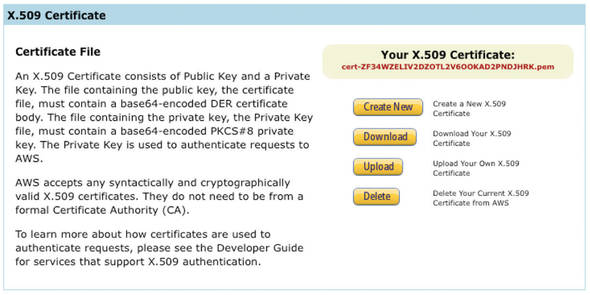
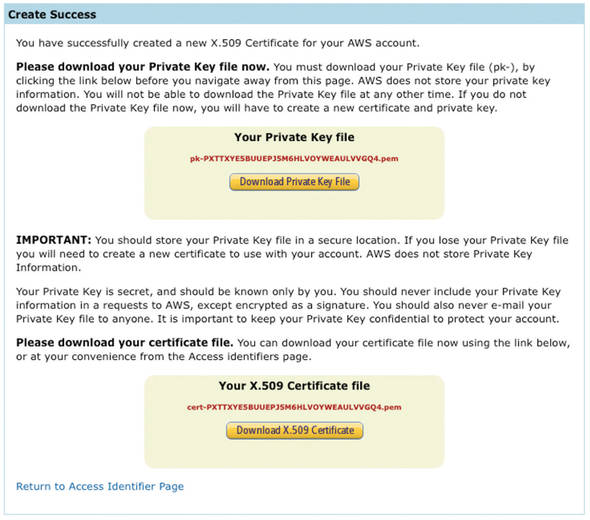
This section is a quick introduction to setting up AWS. We only cover the essentials to get a Hadoop cluster running. If you are already familiar with launching and using EC2 instances, you should skip directly to the next section on setting up Hadoop on AWS.
To start using AWS, you first have to sign up for an account. Go to http://aws.amazon.com/ and click on the button urging you to “Sign Up Now.” The process is self-explanatory. It’s no more complicated than buying a book from Amazon. The sign-up process sets up your Amazon account (which you may already have if you have bought stuff from Amazon before) and activates it to pay for your usage of AWS.