concept database cursor in category data
appears as: database cursor, A database cursor

This is an excerpt from Manning's book Data Wrangling with JavaScript.
Table 8.1 Tools used in chapter 8
API / Library Function Notes MongoDB findRetrieve a database cursor so that we can visit each record in the database incrementally. skip and limitRetrieve a data window, or collection of records, so that we can visit every record of the database in batches. createIndexCreate a database index for efficient query and sorting. find(query)Find records using a database query. find({}, projection)Retrieve records but with certain fields discarded. sortSort records retrieved from the database. Node.js spawn, forkCreate new operating system processes to operate on data in parallel. async-await-parallel parallel(sequence, X)Execute a sequence of operations where X operations are executed in parallel.
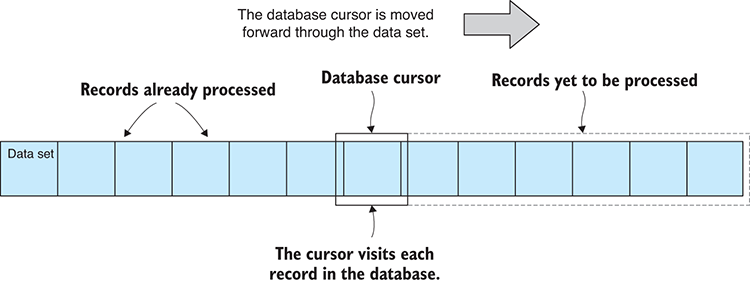
Listing 8.3 demonstrates how to create a database cursor and traverse the entire data set, sequentially visiting each record. You can run this script, but make sure you run it on a database that contains data! Out of this box, this script connects to the database on port 7000, which is the prefilled database created by the second Vagrant script. Please change the port number to 6000 if you populated the database yourself from the first Vagrant script or to 27017 if you’re using a local database that you installed yourself.
Listing 8.3 Using the database cursor to incrementally traverse the database one record at a time (listing-8.3.js)
// ... openDatabase function is omitted ...

let numRecords = 0;

function readDatabase (cursor) {    #1
 return cursor.next()    #2
        .then(record => {
            if (record) {
 console.log(record);    #3
                ++numRecords;

 return readDatabase(cursor);    #4
            }
 else {    #5
                // No more records.
 }    #5
        });
};    #1

openDatabase()    #6
    .then(db => {
 const databaseCursor = db.collection.find();    #7
 return readDatabase(databaseCursor)    #8
 .then(() => db.close());    #9
    })
    .then(() => {
        console.log("Displayed " + numRecords + " records.");
    })
    .catch(err => {
        console.error("An error occurred reading the database.");
        console.error(err);
    });

#1   This is a helper function to read the entire database record by record.
#2   Calls the cursor’s next function to traverse to the next record
#3   Visits a single record. Add your data processing code here.
#4   Recurses to visit the next record
#5   No more records. This ends the traversal.
#6   Opens a connection to our database
#7   Calls the find function to create a database cursor
#8   Passes the cursor to readDatabase to initiate the traversal
#9   Closes the database when we are finished
Figure 8.6 A database cursor allows us to visit each record in the database one after the other.