concept document in category data

This is an excerpt from Manning's book Data Science Bookcamp: Five Python Projects.
Rapid text analysis is able to save lives. Consider this actual real-world incident, when US soldiers stormed a terrorist compound. In the compound, they discovered a computer containing terabytes of archived data. The data included documents, text-messages, and e-mails pertaining to terrorist activities. The documents were too numerous to be read by any single human being. Fortunately, the soldiers were equipped with special software for very fast analysis of text. The software allowed the soldiers process all text-data without even having to leave the compound. The onsite analysis immediately revealed an active terrorist plot in a nearby neighborhood. The soldiers instantaneously responded to the plot, and prevented a terrorist attack.
An HTML document is composed of HTML elements. Each element corresponds to some document. component. For instance, the document’s title is an element. Every single paragraph within the document is also an element. The starting location of an element is demarcated by a start-tag. For instance, the start-tag of a title is
<title>while the start-tag of a paragraph is<p>. Every start tag begins and ends with angled brackets,<>. Adding a forward slash to the tag will transform it into an end-tag. The endpoint of most elements are demarcated by end-tags. Thus, the immediate text of a title is followed by</title>, while the text of a paragraph is followed by</p>. Shortly, we’ll explore many common HTML tags. However, first we must introduce the most important HTML tag;<html>. It specifies the start on the entire html document. Lets utilize that tag to create a document composed of just a single word; Hello. We’ll generate the contents of the document by codinghtml_contents = "<html>Hello</html>"
Figure 16.2. A rendered HTML document. The document’s title does not appear in the rendered output. Only the word Hello is visible.

Figure 16.3. A web-browser rendering of the HTML document. The document’s title appears within the browser’s title bar.
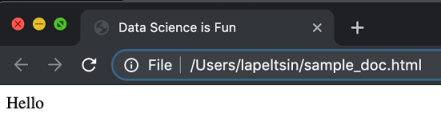
Despite its partial invisibility, the title provides us with very important information. It summarizes the contents of the document. For instance, within a job-listing, the title directly summarizes the nature of the job. Thus, the title reflects vital information despite its absence from the body of the document. This critical distinction is commonly emphasized using
<head>and<body>tags. The content delimited by the HTML<body>tag will appear in the body of the output. Meanwhile,<head>delimits vital information that is not rendered within the body. Lets emphasize this distinction by nestingtitlewithin the head element of the HTML. We’ll also nest the visible Hello within the body element of the contents.Listing 16.5. Adding a head and body to the HTML string
head = f"<head>{title}</head>"
body = "<body>Hello</body>"
html_contents = f"<html> {title} {body}</html>"
Occasionally, we’ll want to display a document’s title within the body of a page. For instance, in a job-posting, the employer will likely want to visualize the title of the job. This visualized title is referred is the page header. It is demarcated with the
<h1>tag. Of course, that tag is nested within<body>, where all visualized content is to be found. Below, we’ll add a header to the body of our HTML.

This is an excerpt from Manning's book Mastering Large Datasets with Python: Parallelize and Distribute Your Python Code.
The Hadoop creators designed Hadoop to work on unstructured data—a term that refers to data in the form of documents. Though they will often contain useful, interpretable metadata—for example, author or date—the important content is typically unrestricted in form. A classic example of unstructured data is a web page.