concept JavaScript in category data

This is an excerpt from Manning's book Data Wrangling with JavaScript.
Jupyter Notebook (formerly IPython Notebook) is a great environment for exploratory coding, but you have this type of tool in JavaScript now. Jupyter itself has a plugin that allows it to run JavaScript. Various JavaScript-specific tools are also now available, such as RunKit, Observable, and my own offering is Data-Forge Notebook.
I’ve used Python for working with data, but I always felt that it didn’t fit well into my development pipeline. I’m not saying there’s anything wrong with Python; in many ways, I like the language. My problem with Python is that I already do much of my work in JavaScript. I need my data analysis code to run in JavaScript so that it will work in the JavaScript production environment where I need it to run. How do you do that with Python?
You could do your exploratory and analysis coding in Python and then move the data to JavaScript visualization, as many people do. That’s a common approach due to JavaScript’s strong visualization ecosystem. But then what if you want to run your analysis code on live data? When I found that I needed to run my data analysis code in production, I then had to rewrite it in JavaScript. I was never able to accept that this was the way things must be. For me, it boils down to this: I don’t have time to rewrite code.
But does anyone have time to rewrite code? The world moves too quickly for that. We all have deadlines to meet. You need to add value to your business, and time is a luxury you can’t often afford in a hectic and fast-paced business environment. You want to write your data analysis code in an exploratory fashion, à la Jupyter Notebook, but using JavaScript and later deploying it to a JavaScript web application or microservice.
This led me on a journey of working with data in JavaScript and building out an open source library, Data-Forge, to help make this possible. Along the way I discovered that the data analysis needs of JavaScript programmers were not well met. This state of affairs was somewhat perplexing given the proliferation of JavaScript programmers, the easy access of the JavaScript language, and the seemingly endless array of JavaScript visualization libraries. Why weren’t we already talking about this? Did people really think that data analysis couldn’t be done in JavaScript?
These are the questions that led me to write this book. If you know JavaScript, and that’s the assumption I’m making, then you probably won’t be surprised that I found JavaScript to be a surprisingly capable language that gives substantial productivity. For sure, it has problems to be aware of, but all good JavaScript coders are already working with the good parts of the language and avoiding the bad parts.
These days all sorts of complex applications are being written in JavaScript. You already know the language, it’s capable, and you use it in production. Staying in JavaScript is going to save you time and effort. Why not also use JavaScript for data wrangling?
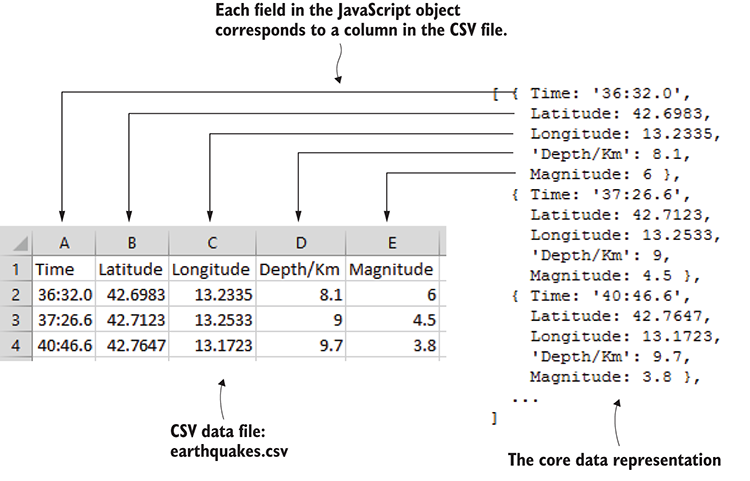
Figure 3.3 Fields in JavaScript objects correspond to columns in earthquakes.csv.
Listing 5.4 Using code to examine your data types (listing-5.4js)
const importCsvFile = require('./toolkit/importCsvFile.js');

importCsvFile("./data/monthly_crashes-cut-down.csv")
    .then(data => {
        const sample = data[0];
 console.log("Year: " + typeof(sample.Year));    #1
 console.log("Month: " + typeof(sample.Month));    #1
 console.log("Crashes: " + typeof(sample.Crashes));    #1
 console.log("Fatalities: " + typeof(sample.Fatalities));    #1
    })
    .catch(err => {
        console.error(err && err.stack || err);
    });

#1   Checks the type of each data field using JavaScript’s typeof operator

This is an excerpt from Manning's book Linked Data: Structured data on the Web.
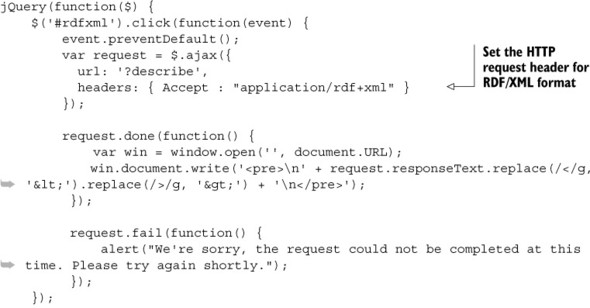
If you look at the HTML source code for the Browns Ferry page, you’ll see how the Linked Data is accessed. The following listing shows the relevant HTML and listing 1.4 shows the JavaScript click handlers.
Listing 1.3. HTML for Linked Data elements shown in figure 1.10

Listing 1.4. JavaScript click function handlers for HTML elements shown in listing 1.3
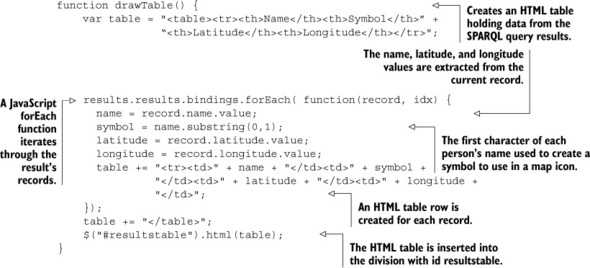
So far you’ve seen SPARQL results in a text format, as created by the ARQ utility. The SPARQL standard defines an XML format for SPARQL results. There’s also a widely used JSON syntax for SPARQL results, primarily used by web developers working in JavaScript. The details of these formats are provided in appendix B, but an overview is presented here.
Three JavaScript components are added to the HTML page’s header. They are shown in listing 5.23. The first is JQuery, a popular library to make writing JavaScript easier. JQuery is optional, of course, but used by millions of developers.