concept multiple file in category data

This is an excerpt from Manning's book Data Wrangling with JavaScript.
Most of the code repositories contain one file per listing, for example listing-2.1.js, listing-2.2.js, and so on, although in several of the repositories, for example with chapter 2, you’ll find subdirectories that contain multiple files for each code listing.
Table 6.1 Tools used in chapter 6
In this section, we’ll keep it simple and focus on the concatenation method. We aim to read multiple files into memory, concatenate them in memory, and then write them out to a single, large data file. We’ll use a JavaScript library called globby to find the files. We already have file import and export capability using our toolkit functions. To do the concatenation, we’ll use JavaScript’s array
concatfunction. The process is shown in figure 6.10.Figure 6.10 Aggregating multiple input files into a single output file
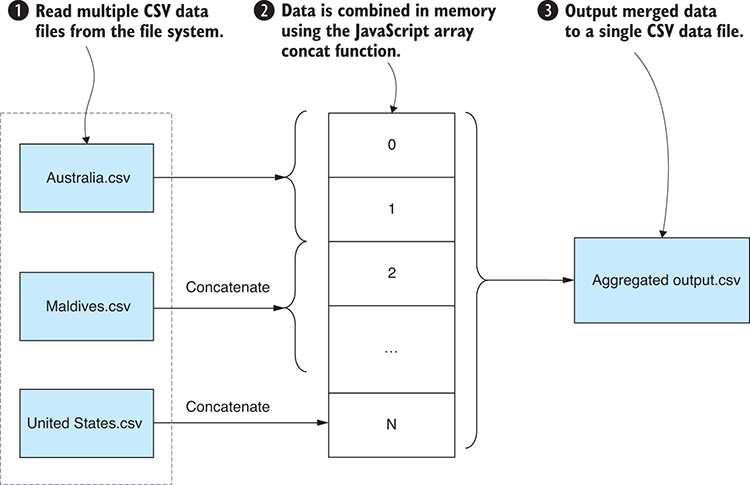
To concatenate multiple files, we perform the following process:
Listing 6.10 shows the code that uses globby and our toolkit function
importCsvFileto load multiple files into memory. We use the JavaScriptreducefunction to reduce the selection of imported files into a single concatenated JavaScript array. For each imported file, we call theconcatfunction to append the imported records into the combined array. You should run this code and look at the merged output file surveys-aggregated-from-separate-files.csv that it creates.Listing 6.10 Aggregating multiple files using globby (listing-6.10.js)
const globby = require('globby');    #1
const importCsvFile = require('./toolkit/importCsvFile.js');
const exportCsvFile = require('./toolkit/exportCsvFile.js');

const inputFileSpec = "./data/by-country/*.csv";    #2
const outputFileName =
    "./output/surveys-aggregated-from-separate-files.csv";

globby(inputFileSpec)    #3
 .then(paths => {    #4
 return paths.reduce((prevPromise, path) => {    #5
 return prevPromise.then(workingData => {    #5
 return importCsvFile(path)    #6
                        .then(inputData => {
 return workingData.concat(inputData);    #7
                        });
 });    #5
 }, Promise.resolve([]));    #5
    })
    .then(aggregatedData => {
 return exportCsvFile(outputFileName, aggregatedData);    #8
    })
    .then(() => {
        console.log("Done!");
    })
    .catch(err => {
        console.error("An error occurred.");
        console.error(err);
    });

#1   Requires the globby library
#2   This wildcard defines the list of input files that we’d like to merge together.
#3   Invokes globby
#4   Globby delivers a list of paths that match the file spec.
#5   Works through each file to asynchronously load and merge them
#6   Imports each CSV input file in turn
#7   Uses the concat function to merge data rows into a single array
#8   Outputs the aggregated data to a single output CSV file