concept record in category data

This is an excerpt from Manning's book Data Wrangling with JavaScript.
Skipping and limiting records to view a reduced window of the data
Table 8.1 Tools used in chapter 8
API / Library Function Notes MongoDB findRetrieve a database cursor so that we can visit each record in the database incrementally. skip and limitRetrieve a data window, or collection of records, so that we can visit every record of the database in batches. createIndexCreate a database index for efficient query and sorting. find(query)Find records using a database query. find({}, projection)Retrieve records but with certain fields discarded. sortSort records retrieved from the database. Node.js spawn, forkCreate new operating system processes to operate on data in parallel. async-await-parallel parallel(sequence, X)Execute a sequence of operations where X operations are executed in parallel.
Listing 8.1 Toolkit function for opening a MongoDB output stream (toolkit/open-mongodb-output-stream.js)
const stream = require('stream');    #1

function openMongodbOutputStream (dbCollection) {    #2

 const csvOutputStream = new stream.Writable({ objectMode: true });    #3
 csvOutputStream._write = (chunk, encoding, callback) => {    #4
 dbCollection.insertMany(chunk)    #5
 .then(() => {    #6
 callback();    #6
 })    #6
 .catch(err => {    #7
 callback(err);    #7
 });    #7
 };    #4

    return csvOutputStream;
};    #2

module.exports = openMongodbOutputStream;    #8

#1   Requires Node.js streams API
#2   Defines our new toolkit function to open a writable MongoDB stream
#3   Instantiates a writable stream with object mode enabled
#4   Implements the _write function to handle writes to the stream
#5   Inserts a collection of records to the database
#6   The database insertion has completed successfully; now it invokes the stream’s callback.
#7   The database insertion has failed; now it invokes the callback with the error.
#8   Exports the toolkit function for use in other code modules
Visiting every record in the database one by one is hardly the most efficient technique for data access, although at least we can use it to handle a large data set. However, we can increase our data throughput by working with multiple records at a time instead of a single record at a time. This is still incremental processing, but now we’ll use data windows, where each window is a batch of records, rather than a single record. After processing each data window, we move the window forward. This allows us to sequentially view each set of records, as shown in figure 8.7.
Figure 8.7 Dividing a data set into windows for efficient incremental processing
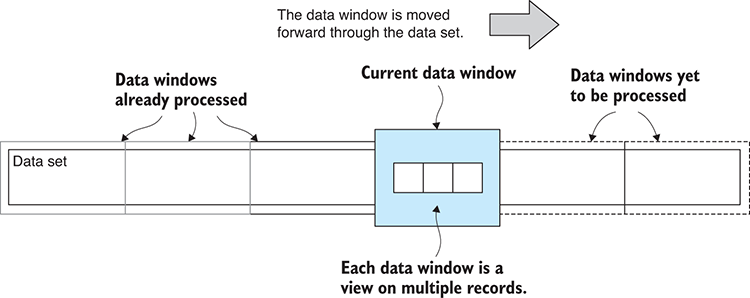
We can read a window of data by chaining calls to
skipandlimitafter calling MongoDB’sfindfunction.skipallows us to skip a number of records; we use this to select the starting record in the window.limitallows us to retrieve only a certain number of records; we can use this to constrain the number of records that are in a window. Code for this is shown in listing 8.4. You can run this code and it will read database records window by window. It doesn’t do anything useful though, but it does have a placeholder where you can add your own data processing code.Listing 8.4 Using data windows to process batches of database records (listing-8.4.js)
// ... openDatabase function is omitted

let numRecords = 0;
let numWindows = 0;

function readWindow (collection, windowIndex, windowSize) {    #1
 const skipAmount = windowIndex * windowSize;    #2
 const limitAmount = windowSize;    #3
 return collection.find()    #4
 .skip(skipAmount)    #4
 .limit(limitAmount)    #4
 .toArray();    #4
};    #1

function readDatabase (collection, startWindowIndex, windowSize) {    #5
 return readWindow(collection, startWindowIndex, windowSize)    #6
        .then(data => {
            if (data.length > 0) {
 console.log("Have " + data.length + " records.");    #7

                // Add your data processing code here.

                numRecords += data.length;
                ++numWindows;

 return readDatabase(  #8
 collection,    #8
 startWindowIndex+1,    #8
 windowSize    #8
 );    #8
            }
 else {    #9
                // No more data.
 }    #9
        })

};    #5

openDatabase()    #10
    .then(db => {
 const windowSize = 100;    #11
 return readDatabase(db.collection, 0, windowSize)    #12
            .then(() => {
 return db.close();    #13
            });
    })
    .then(() => {
        console.log("Processed " + numRecords +
            " records in " + numWindows + " windows."
        );
    })
    .catch(err => {
        console.error("An error occurred reading the database.");
        console.error(err);
    });

#1   This is a helper function to read a data window from the database.
#2   Determines how many records to skip to get the window
#3   This is the number of records that the window contains.
#4   This is the database query that retrieves the data window.
#5   This is a helper function to read the entire database window by window.
#6   Reads the next data window from the database
#7   We got a data window back; add your data processing here.
#8   Recurses to read the next data window
#9   No more data; we have finished reading the database.
#10   Opens the connection to the database
#11   Specifies the size of each data window and the number of records per window
#12   Initiates traversal of the database
#13   Closes the database when we’re finished
This is an excerpt from Manning's book Hadoop in Action.
Provide an object (RecordReader) to iterate through records in a given split, and to parse each record into key and value of predefined types.
Figure 5.1. In repartitioned join, the mapper first wraps each record with a group key and a tag. The group key is the joining attribute, and the tag is the data source (table in SQL parlance) of the record. The partition and shuffle step will group all the records with the same group key together. The reducer is called on the set of records with the same group key.
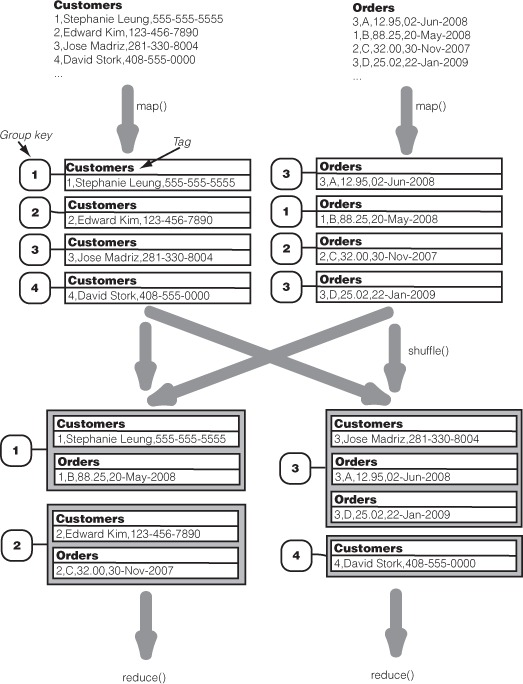
Recall that in the MapReduce framework, map() outputs records as key/value pairs that are partitioned on the key, and all records of the same key will end up in a single reducer and be processed together. For joining, we would want the map() function to output a record package where the key is the group key for joining—the Customer ID in this case. The value in this key/value package will be the original record, tagged with the data source (i.e., filename). For example, for the record
3,A,12.95,02-Jun-2008from the Orders file, map() will output a key/value pair where the key is "3", the Customer ID that will be used to join with records from the Customers file. The value output by map() is the entire record wrapped by a tag "Orders".
After map() packages each record of the inputs, MapReduce’s standard partition, shuffle, and sort takes place. Note that as the group key is set to the join key, reduce() will process all records of the same join key together. The function reduce() will unwrap the package to get the original record and the data source of the record by its tag. We see that for group keys (Customer IDs) "1" and "2", the reduce() function gets two values. One value is tagged with "Customers" and the other value is tagged with "Orders". For the map output with (group) key "4", reduce() will only see one value, which is tagged with "Customers". This is expected as there is no record in Orders with a Customer ID of "4". On the other hand, reduce() will see three values for the (group) key "3". This is due to one record from Customers and two more from Orders.
Our toy example has an implicit schema that Customer ID identifies a unique record in Customers, making the number of combinations in a cross-product always the number of Orders records with the Customer ID (except when it’s zero, in which case the cross-product is the Customers record itself). For more complicated settings, the number of combinations generated by the cross-product is the product of the number of records under each tag. If reduce() sees two Customers records and three Orders records together, then the cross-product will create six (2 * 3) combinations. If there’s a third data source (Accounts) with two records, then the cross-product will create twelve (2 * 2 * 3) combinations.
It feeds each combination from the cross-product into a function called combine(). (Don’t confuse with combiners as explained in section 4.5.) Due to the nature of the cross-product, combine() is guaranteed to see at most one record from each of the data sources (tags), and all the records it sees have the same join key. It’s the combine() function that determines whether the whole operation is an inner join, outer join, or another type of join. In an inner join, combine() drops all combinations where not all tags are present, such as our case with group key "4". Otherwise combine() merges the records from different sources into a single output record.
Now you see why we call this joining process the repartitioned sort-merge join. The records in the original input sources can be in random order. They are repartitioned onto the reducers in the right grouping. The reducer can then merge records of the same join key together to create the desired join output. (The sort happens but it’s not critical to understanding the operation.)