concept rest api in category data

This is an excerpt from Manning's book Data Wrangling with JavaScript.
I build a simple web server using Express.js. The web server hosts a REST API that exposes the reef data using HTTP GET. The REST API is the interface between the server and your web application (figure 1.14).
Next, I create a simple web application that uses the REST API to retrieve the data in JSON format. My simple web app retrieves data from the database using the REST API, and I can put that data to work. I’m using C3 here to render a chart. I add the chart to the web page and use JavaScript to inject the data. We’ll learn more about C3 later in the book.
Need to import JSON and export MongoDB? No problem, we can do that! How about importing from a REST API and exporting to CSV? We can do that as well! Using the CDR design pattern, we can easily stitch together whatever data conversion we need to import from any data format on the left (figure 3.5) and export to any on the right.
Figure 3.7 Importing data from a REST API to the CDR
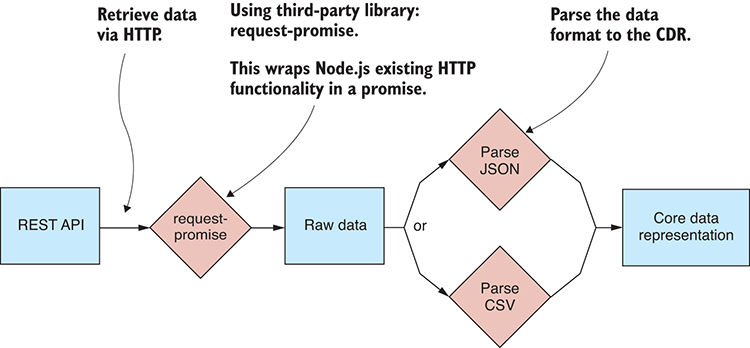
To retrieve data from a REST API, we need to install request-promise. If you’re following along with code from GitHub and did the
npm installin the code repository, you already have this dependency installed. If you need to install it in a fresh Node.js project, you can do it like this:
The simplest possible code to retrieve data via HTTP GET is shown in the following listing using
request-promise’srequest.getfunction to make a request to the REST API. You can run this code, and the retrieved data is printed to the console so that you can check it.Listing 3.4 Retrieving data from a REST API (listing-3.4.js)
const request = require('request-promise');    #1

const url = "https://earthquake.usgs.gov" +    #2
 "/earthquakes/feed/v1.0/summary/significant_month.geojson";    #2

request.get(url)    #3
 .then(response => {    #4
 console.log(response);    #4
 })    #4
 .catch(err => {    #5
 console.error(err);    #5
 });    #5

#1   Requires request-promise - third-party library to request data from a REST API
#2   This is the URL to access the REST API.
#3   Performs an HTTP GET request to the REST API
#4   Handles the response; this is the data that is returned from the REST API.
#5   Handles any error that might occur