concept web page in category data

This is an excerpt from Manning's book Data Science Bookcamp: Five Python Projects.
The Internet is a great resource for text data. Millions of web pages offer limitless text content, in the form of news articles, encyclopedia pages, scientific papers, restaurant reviews, political discussions, patents, corporate financial statements, job postings, etc. All these pages can be analyzed, if we download their HTML files. HTML stands for Hypertext Markup Language. A markup language is a system for annotating documents, which distinguishes the annotations from the document text. In the case of HTML, these annotations are instructions on how to visualize a web page.

This is an excerpt from Manning's book Data Wrangling with JavaScript.
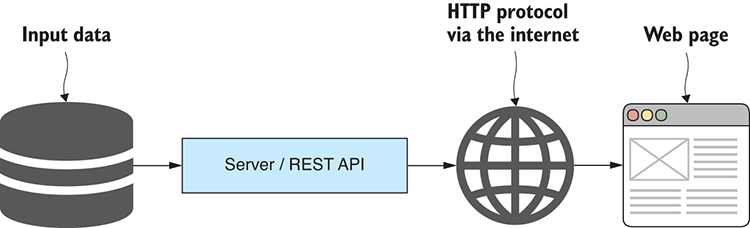
Next, I create a simple web application that uses the REST API to retrieve the data in JSON format. My simple web app retrieves data from the database using the REST API, and I can put that data to work. I’m using C3 here to render a chart. I add the chart to the web page and use JavaScript to inject the data. We’ll learn more about C3 later in the book.
Figure 2.2 What we’re creating second: displaying data in a web page that is exposed through a REST API
It’s also a useful capability for us to prerender visualizations on the server side. We might do this so that we can generate reports or to precache images for display in a web page. Server-side rendering of visualizations is so useful that I think it’s worth pushing through the complexity and difficulty of getting set up so that we can add this technique to our toolkit.
The code module in listing 11.3a exports a
startfunction that we can call to kick-start our web server. An example of how we’ll use this is shown in listing 11.3b, where we start the web server and then subsequently stop it. In between you can see a placeholder where we’ll soon add code to render the web page and take a screenshot.Listing 11.3b Using the reusable code module to start and stop the web server (listing-11.3/index.js)
const webServer = require('./web-server.js');    #1

webServer.start()    #2
    .then(server => {
        console.log("Web server has started!");

        // ... Do something with the web server here,
        //     eg capture a screen shot of the web page or
        //     run automated integration tests against it  ...

 server.close();    #3
    })
    .then(() => {
        console.log("Web server has stopped.");
    })
    .catch(err => {
        console.error("Web server failed to start :(");
        console.error(err);
    });

#1   Requires our reusable web server module
#2   Starts the web server
#3   Stops the web server when we’re finished with it
This technique, starting and stopping our web server, is also useful for doing automated integration testing on a website. Imagine that the placeholder comment in listing 11.3b is replaced by a series of tests that poke and prod the web page to see how it responds. We’ll take another look at automated testing in chapter 14.

This is an excerpt from Manning's book Linked Data: Structured data on the Web.
The rich snippets program is powered by a form of Linked Data known as the Resource Description Framework in Attributes (RDFa). RDFa is a way of encoding meaning in web pages and will be covered later at length. It’s one format for Linked Data. For example, a telephone number on a web page is readable by people, but by marking up the number with HTML attributes that are hidden in a browser’s display, Google’s search engine can also determine that it is a telephone number. Google can use that information to construct more targeted search results. Best Buy, the large consumer electronics retailer, has reported that the use of RDFa resulted in the a 15%–30% increase in click-through rate for its Google results.
Facebook introduced its Like button in April 2010. When a user clicks a Like button on a web page, that user’s Facebook profile is updated to show that they liked the thing that page talks about—be it an article, a movie, or a restaurant. The Like button (figure 1.3) is powered by RDFa.
A template system to automatically generate web pages for each member of an OWL class. OWL classes are technically either equivalent to or subclasses of RDF Schema classes (depending on the OWL profile used), but for our purposes you can think of them as being equivalent.
You can extend the weather information collection app from chapter 7 to combine multiple datasets and display the results on a web page. This is a demonstration of retrieving real-world data from multiple sources on the Web, converting it into Linked Data, and making an application using it. This application applies many of the lessons you’ve learned in this book. You’ll extend the application developed in chapter 7 by creating a good-looking web user interface for it. By the end of this section you’ll have gone from existing data in CSV and XML that are available from real-world government data sources and ended up with a useful Linked Data application.