concept dataframe in category deep learning
appears as: dataframe, dataframes, dataframe, dataframes

This is an excerpt from Manning's book Deep Learning with Structured Data.
If you are reading this book you will be familiar with relational databases and the organization of data in tables with rows and columns. You can think of the Pandas library as Python’s native (Pythonic) approach to representing and manipulating tabular structured data. The key structure in Pandas is the dataframe. You can think of a dataframe as a Python approach to a relational table. Like a table, a dataframe:
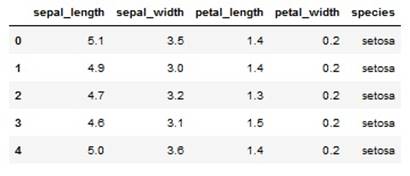
Figure 2.3 output of head() for the dataframe loaded with the Iris dataset
def load_xls(path, files_xls, firstfile, firstsheet, df):    #A
      '''
    load all the tabs of all the XLS files in a list of XLS files, minus tab that has seeded dataframe

    Parameters:
    path: directory containing the XLS files
    files_xls: list of XLS files
    firstfile: file whose first tab has been preloaded
    firstsheet: first tab of the file that has been preloaded
    df: Pandas dataframe that has been preloaded with the first tab of the first XLS file and is loaded with all the data when the function returns

    Returns:
    df: updated dataframe

    '''
    for f in files_xls: #B
        print("file name",f)
        xlsf = pd.ExcelFile(path+f)
        for sheet_name in xlsf.sheet_names:    #C
            print("sheet_name",sheet_name)
            if (f != firstfile) or (sheet_name != firstsheet):
                print("sheet_name in loop",sheet_name)
                data = pd.read_excel(path+f,sheetname=sheet_name)
                df = df.append(data) #D
    return (df)