concept Dataset in category deep learning

This is an excerpt from Manning's book Deep Learning with PyTorch.
At left in figure 1.2, we see that quite a bit of data processing is needed before the training data even reaches our model.4 First we need to physically get the data, most often from some sort of storage as the data source. Then we need to convert each sample from our data into a something PyTorch can actually handle: tensors. This bridge between our custom data (in whatever format it might be) and a standardized PyTorch tensor is the
Datasetclass PyTorch provides intorch.utils.data. As this process is wildly different from one problem to the next, we will have to implement this data sourcing ourselves. We will look in detail at how to represent various type of data we might want to work with as tensors in chapter 4.As data storage is often slow, in particular due to access latency, we want to parallelize data loading. But as the many things Python is well loved for do not include easy, efficient, parallel processing, we will need multiple processes to load our data, in order to assemble them into batches: tensors that encompass several samples. This is rather elaborate; but as it is also relatively generic, PyTorch readily provides all that magic in the
DataLoaderclass. Its instances can spawn child processes to load data from a dataset in the background so that it’s ready and waiting for the training loop as soon as the loop can use it. We will meet and useDatasetandDataLoaderin chapter 7.
It’s a good time to discover what being a subclass of
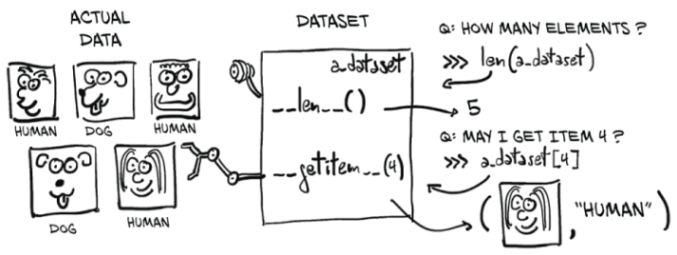
torch.utils.data.Datasetmeans in practice. Looking at figure 7.2, we see what PyTorchDatasetis all about. It is an object that is required to implement two methods:__len__and__getitem__. The former should return the number of items in the dataset; the latter should return the item, consisting of a sample and its corresponding label (an integer index).2
The first step is to get the data in the right shape. We could create a
Datasetsubclass that only includes birds and airplanes. However, the dataset is small, and we only need indexing andlento work on our dataset. It doesn’t actually have to be a subclass oftorch.utils.data.dataset.Dataset! Well, why not take a shortcut and just filter the data incifar10and remap the labels so they are contiguous? Here’s how:# In[5]: label_map = {0: 0, 2: 1} class_names = ['airplane', 'bird'] cifar2 = [(img, label_map[label]) for img, label in cifar10 if label in [0, 2]] cifar2_val = [(img, label_map[label]) for img, label in cifar10_val if label in [0, 2]]The
cifar2object satisfies the basic requirements for aDataset--that is,__len__and__getitem__are defined--so we’re going to use that. We should be aware, however, that this is a clever shortcut and we might wish to implement a properDatasetif we hit limitations with it.4