concept Rasa in category deep learning

This is an excerpt from Manning's book Deep Learning with Structured Data.
Figure 4.16 zooms in on the components that will be used in chapter 8 to deploy the trained deep learning model. For the web deployment, these components include the Flask web deployment library to render HTML web pages where the user can specify the details of their streetcar trip and see the trained deep learning model’s prediction of the whether their trip will be delayed. For the Facebook Messenger deployment, these components include the Rasa chatbot framework, ngrok for connecting Rasa and Facebook, and Facebook application configurations.
Another benefit of the model being deployed via Facebook Messenger with Rasa is flexibility.
Figure 8.8: the interface correctly assesses pairs of queries as being identical
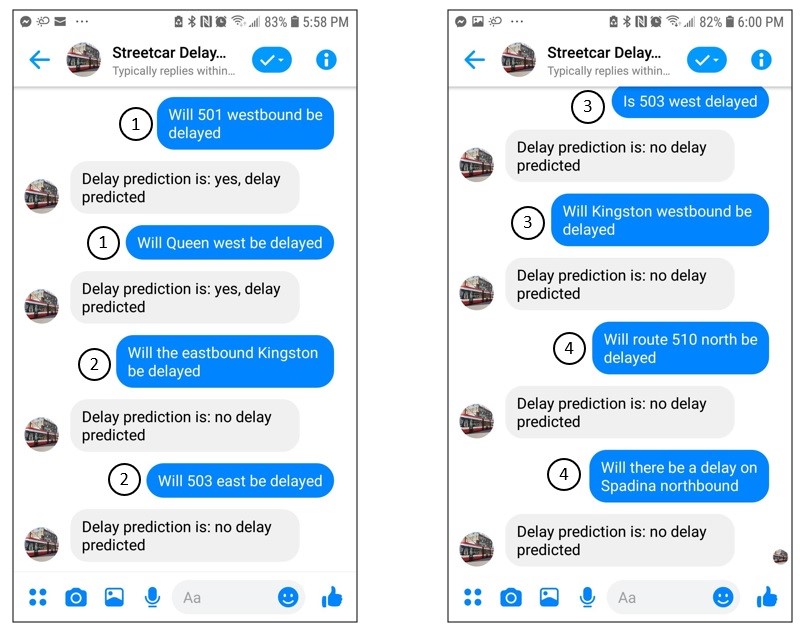
In figure 8.8 pairs of queries are labelled with numbers from 1 to 4. Consider the pairs of queries that are tagged with the same number. Each query in these pairs has the same meaning, and the Rasa model is capable of detecting this despite the phrasing differences between each member of the pairs. The Rasa model gets part of this capability from the examples in nlu.md (single utterance examples) and stories.md (multi-utterance examples) that the Rasa model was trained with. However, that is only part of the story, and as you can see at the above links, Rasa attains this flexibility with a very small number of training examples.
A big part of the capability of chatbots written with Rasa comes from exploiting the natural language processing (NLP) capability that comes by default with Rasa. It’s worth mentioning here that Rasa’s NLP capability is based on deep learning. This means that deep learning drive two parts of the end-to-end solution including Facebook Messenger deployment described in this chapter, as shown in Figure 8.9.
Figure 8.9: Deep learning drives two parts of the end-to-end solution with Facebook Messenger deployment
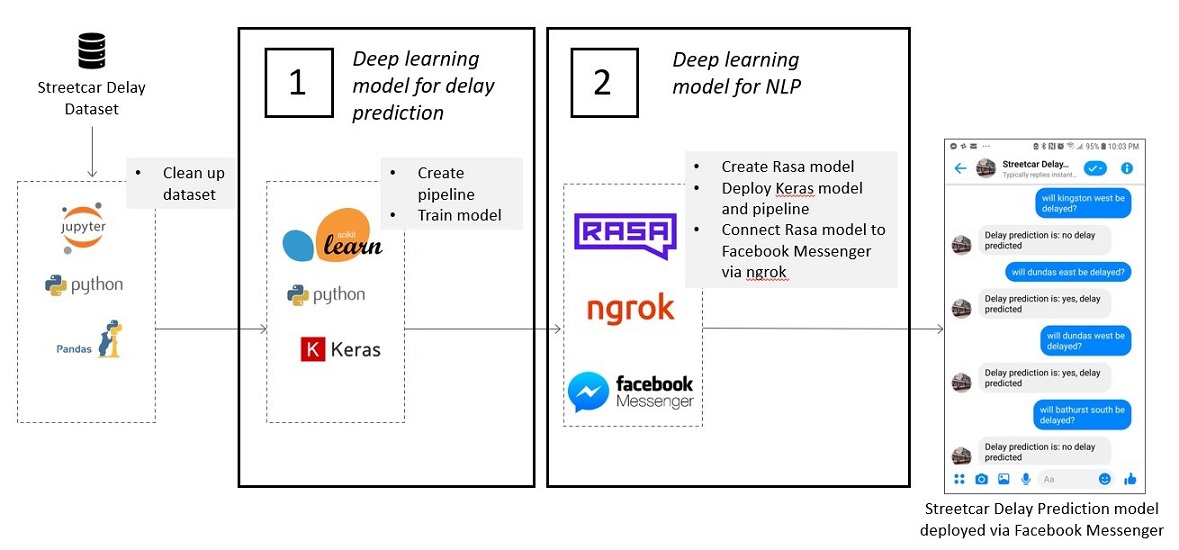
First, there is the streetcar delay prediction deep learning model we have been creating throughout this book. Second, there is the deep learning that underlies the NLP that we get “for free” by using Rasa as part of the deployment of the streetcar delay model.
8.9 More background on Rasa
As mentioned above, a complete review of the Rasa chatbot framework is beyond the scope of this book. Further, the repo contains all the updated Rasa files that you need for the model deployment. Once you have followed through the steps in section 8.10 you should not need to update any of the Rasa-related files. However, if want some more details about how Rasa works, this section gives some additional background on the essential concepts in Rasa along with some pointers to more detailed information.
Rasa is an open-source chatbot development framework that lets you create and train chatbots with natural language interfaces. Rasa provides a simple set of interfaces that let you take advantage of its built-in natural language processing (NLP) without having to deal with the details of training an NLP model. Rasa connects with Python to let you code sophisticated actions in response to user input. Rasa also supports connections to a variety of messaging platforms, including Facebook Messenger. In sum, the Rasa framework gives us everything we need for a simple deployment from interpretation of natural language, to a connection to Python, to an end-user interface with Facebook Messenger.
Figure 8.11 shows the key files used to train a Rasa model along with the Rasa objects defined in each file. When you train a Rasa model (as you will do in step 12 of section 8.10), Rasa will use the training data in the nlu.md and stories.md files to train the model.
Figure 8.11 the key Rasa files and objects defined in them

The other key file in the Rasa framework is actions.py, the file that contains the Python custom actions. If Facebook Messenger is the pretty face of the deployment, and Rasa’s NLP capability is its lovely voice, then actions.py is the brains of the deployment. Let’s take a closer look code in actions.py that gets the slot values that Rasa sets.
The connection between Rasa and actions.py is the tracker structure in the custom class in actions.py. The tracker.get_slot() method lets you get the values of slots set by Rasa, or None if Rasa did not set a value for a slot. This loop in actions.py iterates through the slot values passed from Rasa and loads the scoring dataframe column that corresponds with the slot value or with the default if the slot value is not set.
for col in score_cols:
            if tracker.get_slot(col) != None: #A
                if tracker.get_slot(col) == "today":
                    score_df.at[0,col] = score_default[col] #B
              else:
                   score_df.at[0,col] = tracker.get_slot(col) #C
            else:
                score_df.at[0,col] = score_default[col] #D
This section has provided a very brief overview of some of the key concepts in Rasa. For more details, you can get an overview of Rasa and an overview of its architecture at rasa.com.