concept action in category design

This is an excerpt from Manning's book Usability Matters: Mobile-first UX for developers and other accidental designers.
As I have throughout this book, I encourage you to talk about the people who’ll use the app rather than the users when not discussing an abstract concept. This helps you think about the consequences of your decisions and actions in terms of how those affect real people.
In the last section, I said that over 80% of the people using the search feature in Elliott’s app would select one of the top three entries in the results, but the actions performed before selecting a result weren’t always the same. Approximately half of the people who used the app would tap one of the immediately viewable results. The other half would always scroll down, tap Load More, and look at those results before selecting an option to view in more detail, even if the option they chose was one of the first few originally displayed. That they had to wait while more results loaded was a potential bottleneck.
For actions that take a long time when first performed, do them once before they’re needed so that they respond.

This is an excerpt from Manning's book Design for the Mind: Seven Psychological Principles of Persuasive Design.
Present users with a call to action at the right time
Here we look at motivation, ability, and trigger to explain when we should ask users to engage in a behavior (use our site, click this button), and how we facilitate getting them to the point they say “Yes!” Figure 4.1 shows that users first encounter features designed to increase motivation and ability to engage in a behavior for the trigger to be successful. If a design presents the trigger (call to action) before motivation and ability reach sufficiently high levels, or presents the trigger before addressing motivation and ability, the behavior won’t occur.
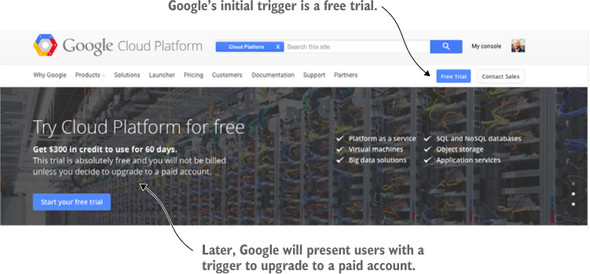
Triggers tell a person to do something. We typically refer to these as a call to action in digital design. Without triggers, a person wouldn’t be aware of or able to engage in a behavior. Triggers must be presented once motivation and ability have reached sufficiently high levels for the person to engage in a behavior. For example, Google offers a free trial of their Cloud Platform (figure 4.5). They allow users to build ability and motivation to use their product over the course of the free trial. Once the trial ends, they’ll present the trigger: the option to purchase the product.
Figure 4.5. Google Cloud Platform presents users with the trigger to “Start your free trial.” When the trial ends, they’ll present the trigger to purchase access to the product.
The principle of motivation, ability, and trigger identifies three types of triggers (aka calls to action) for a behavior. The three types of triggers are
Present clearly labeled jargon-free calls to action Place calls to action throughout an experience, particularly after providing users with motivation and ability Make the call to action relevant to the topic of the page Place the call to action for actions like submit, purchase, and continue, in the appropriate context or location of the workflow Visually distinguish calls to action from other types of information on the page