concept docker in category docker

This is an excerpt from Manning's book Bootstrapping Microservices with Docker, Kubernetes and Terraform.
Before we can deploy our microservice to production we must be able to package it in a Docker image.
docker kill 460a19946689
docker rm 460a19946689


This is an excerpt from Manning's book Learn Docker in a Month of Lunches.
First of all, what’s actually happened? The
dockercontainerruncommand tells Docker to run an application in a container. This application has already been packaged to run in Docker and has been published on a public site that anyone can access. The container package (which Docker calls an “image”) is nameddiamol/ ch02-hello-diamol(I use the acronym diamol throughout this book--it stands for Docker In A Month Of Lunches). The command you’ve just entered tells Docker to run a container from that image.
dockercontainerstatsis another useful one: it shows a live view of how much CPU, memory, network, and disk the container is using. The output is slightly different for Linux and Windows containers:> docker container stats e53 CONTAINER ID NAME CPU % PRIV WORKING SET NET I/O BLOCK I/O e53085ff0cc4 reverent_dubinsky 0.36% 16.88MiB 250kB / 53.2kB 19.4MB / 6.21MB

This is an excerpt from Manning's book Docker in Action, Second Edition.
You’ll use the docker command-line program throughout the rest of this book. To get you started with that, we want to show you how to get information about commands from the docker program itself. This way, you’ll understand how to use the exact version of Docker on your computer. Open a terminal, or command prompt, and run the following command:
docker helpRunning docker help will display information about the basic syntax for using the docker command-line program as well as a complete list of commands for your version of the program. Give it a try and take a moment to admire all the neat things you can do.
The easiest way to find images is to use an index. Indexes are search engines that catalog repositories. There are several public Docker indexes, but by default docker is integrated with an index named Docker Hub.
Docker Hub is a registry and index with a web user interface run by Docker Inc. It’s the default registry and index used by docker and is located at the host docker.io. When you issue a docker pull or docker run command without specifying an alternative registry, Docker will default to looking for the repository on Docker Hub. Docker Hub makes Docker more useful out of the box.
Docker Inc. has made efforts to ensure that Docker is an open ecosystem. It publishes a public image to run your own registry, and the docker command-line tool can be easily configured to use alternative registries. Later in this chapter, we cover alternative image installation and distribution tools included with Docker. But first, the next section covers how to use Docker Hub so you can get the most from the default toolset.
docker pull quay.io/dockerinaction/ch3_hello_registry:latest
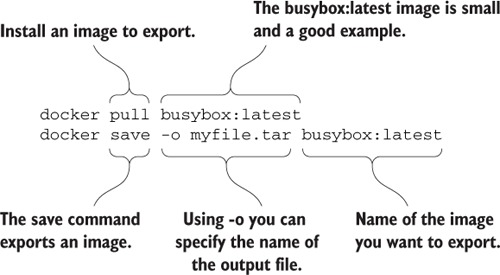
You’ll need an image file to load before we can show you the docker load command. Because it’s unlikely that you have an image file lying around, we’ll show you how to save one from a loaded image. For the purposes of this example, you’ll pull busybox:latest. That image is small and easy to work with. To save that image to a file, use the docker save command. Figure 3.5 demonstrates docker save by creating a file from BusyBox.
We used the .tar filename suffix in this example because the docker save command creates TAR archive files. You can use any filename you want. If you omit the –o flag, the resulting file will be streamed to the terminal.
Docker Hub is the default Docker registry. You can find software on Docker Hub through either the website or the docker command-line program. The docker command-line program makes it simple to install software that’s distributed through alternative registries or in other forms.

This is an excerpt from Manning's book Docker in Practice, Second Edition.
You can build and run a Docker application from a Dockerfile using the commands docker build and docker run.
The docker exec command is the correct way to get inside a running container—resist installing SSH.

This is an excerpt from Manning's book Docker in Action.
docker run dockerinaction/hello_world
Docker Hub is a registry and index with a website run by Docker Inc. It’s the default registry and index used by Docker. When you issue a docker pull or docker run command without specifying an alternative registry, Docker will default to looking for the repository on Docker Hub. Docker Hub makes Docker more useful out of the box.
Docker Inc. has made efforts to ensure that Docker is an open ecosystem. It publishes a public image to run your own registry, and the docker command-line tool can be easily configured to use alternative registries. Later in this chapter I cover alternative image installation and distribution tools included with Docker. But first, the next section covers how to use Docker Hub so you can get the most from the default toolset.
docker run -it --rm dockerinaction/ch3_ex2_hunt
You’ll need an image file to load before I can show you the docker load command. Because it’s unlikely that you have an image file lying around, I’ll show you how to save one from a loaded image. For the purposes of this example, you’ll pull busybox:latest. That image is small and easy to work with. To save that image to a file, use the docker save command. Figure 3.5 demonstrates docker save by creating a file from BusyBox.
I used the .tar filename suffix in this example because the docker save command creates TAR archive files. You can use any filename you want. If you omit the –o flag, the resulting file will be streamed to the terminal.
The docker command line will search the Docker Hub index for you and display the results, including details like the number of times each repository has been starred, a flag to indicate that a particular repository is official (the OFFICIAL column), and a flag to indicate if the repository is what they call a trusted image (the TRUSTED column). The Docker Hub website allows registered users to star a repository in a similar fashion to other community development sites like GitHub. A repository’s star count can act as a proxy metric for image quality and popularity or trust by the community. Docker Hub also provides a set of official repositories that are maintained by Docker Inc. or the current software maintainers. These are often called libraries.