concept Docker Machine in category docker

This is an excerpt from Manning's book Docker in Action.
Docker Compose is a critical tool for anyone who has made Docker a core component of their infrastructure. With it, you’ll be able to reduce iteration time, version control environments, and orchestrate ad hoc service interactions with declarative documents. Chapter 12 builds on Docker Compose use cases and introduces Docker Machine to help with forensic and automated testing.
The first and most important thing to know how to do with Docker Machine is how to create Docker hosts. The next three commands will create three hosts using the VirtualBox driver. Each command will create a new virtual machine on your computer:
docker-machine create --driver virtualbox host1
docker-machine create --driver virtualbox host2
docker-machine create --driver virtualbox host3
After you run these three commands (they can take a few minutes), you’ll have three Docker hosts managed by Docker Machine. Docker Machine tracks these machines with a set of files in your home directory (under ~/.docker/machine/). They describe the hosts you have created, the certificate authority certificates used to establish secure communications with the hosts, and a disk image used for VirtualBox-based hosts.
Docker Machine is a great tool for building and managing machines in a Docker-based fleet. Docker Compose provides orchestration for Docker container-based services. The main problems that remain are scheduling containers across a fleet of Docker machines and later discovering where those services have been deployed. Docker Swarm will provide the solutions.
Docker Machine can provision Swarm clusters as easily as standalone Docker machines. The only difference is a small set of additional command-line parameters that are included when you use the create subcommand.
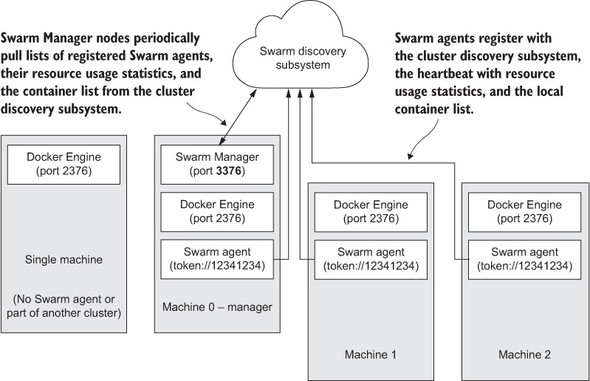
The first, --swarm, indicates that the machine being created should run the Swarm agent software and join a cluster. Second, using the --swarm-master parameter will instruct Docker Machine to configure the new machine as a Swarm manager. Third, every type of machine in a Swarm cluster requires a way to locate and identify the cluster it’s joining (or managing). The --swarm-discovery parameter takes an additional argument that specifies the unique identifier of the cluster. Figure 12.4 illustrates a small cluster of machines and a standalone machine for contrast.
In this illustration you can see that the Swarm agent on each node communicates with a Swarm discovery subsystem to advertise its membership in a cluster identified by token://12341234. Additionally, the single machine running the Swarm manager polls the Swarm discovery subsystem for an updated list of nodes in the cluster. Before diving into the Swarm discovery subsystem and other mechanics at work here, use Docker Machine to create a new Swarm cluster of your own. The next few commands will guide you through this process.