concept Linux in category docker

This is an excerpt from Manning's book Bootstrapping Microservices with Docker, Kubernetes and Terraform.
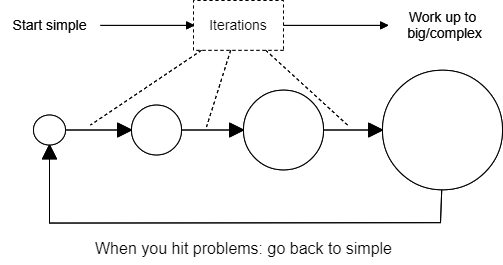
Some stacks have names. For example MEAN (Mongo, Express, Angular, Node.js) or LAMP (Linux, Apache, MySQL, PHP). But your stack is just the combination of tools you use and it doesn’t need a name to be valid.
az --version

This is an excerpt from Manning's book Learn Docker in a Month of Lunches.
One of the key drivers for modern IT is consistency: teams want to use the same tools, processes, and runtime for all their projects. You can do that with Docker, using containers for everything from old .NET monoliths running on Windows to new Go applications running on Linux. You can build a Docker cluster to run all those apps, so you build, deploy, and manage your entire application landscape in the same way.
There are dozens of try-it-now exercises in this book, and if you’ve used different machines to follow along, you’ll have seen that the exercises work in the same way on Mac, Windows, Linux, and Raspberry Pi. That’s not an accident--I’ve built every Docker image in this book as a multi-architecture image. Multi-arch images are built and pushed to registries with multiple variants, each targeting a different operating system or CPU architecture, but all using the same image name. When you use one of these images to run a container or to build another image, Docker pulls the matching variant for the CPU and OS on your machine. If you use the same image name on a different architecture, you’ll get a different image variant, but it will be the same app and it will work in the same way. It’s a super-easy workflow for the user, but it takes some effort for the image publisher.
# store your Docker ID in a variable - on Windows:
 $dockerId = '<your-docker-hub-id>'

 # or on Linux:
 dockerId='<your-docker-hub-id>'

 # tag the images with your own account name:
 docker image tag diamol/ch16-folder-list:linux-amd64 "$dockerId/ch16-folder-list:linux-amd64"
 docker image tag diamol/ch16-folder-list:linux-arm64 "$dockerId/ch16-folder-list:linux-arm64"
 docker image tag diamol/ch16-folder-list:linux-arm "$dockerId/ch16-folder-list:linux-arm"

 # and push to Docker Hub (this pushes all the tags for the image):
 docker image push "$dockerId/ch16-folder-list"

This is an excerpt from Manning's book Docker in Action, Second Edition.
Because Docker is available and supported on Linux, macOS, and Windows, most software packaged in Docker images can be used on any computer.
First, you can specify the relative weight of a container to other containers. Linux uses this to determine the percentage of CPU time the container should use relative to other running containers. That percentage is for the sum of the computing cycles of all processors available to the container.
This chapter introduced the isolation features provided by Linux and talked about how Docker uses those to build configurable containers. With this knowledge, you will be able to customize that container isolation and use Docker for any use case. The following points were covered in this chapter:

This is an excerpt from Manning's book Docker in Action.
As noted earlier, containers have existed for decades. Docker uses Linux namespaces and cgroups, which have been part of Linux since 2007. Docker doesn’t provide the container technology, but it specifically makes it simpler to use. To understand what containers look like on a system, let’s first establish a baseline. Figure 1.1 shows a basic example running on a simplified computer system architecture.
First, you can specify the relative weight of a container. Linux uses this to determine the percentage of CPU time the container should use relative to other running containers. That percentage is for the sum of the computing cycles of all processors available to the container.
Linux provides a few tools for sharing memory between processes running on the same computer. This form of inter-process communication (IPC) performs at memory speeds. It’s often used when the latency associated with network or pipe-based IPC drags software performance down below requirements. The best examples of shared memory-based IPC use are in scientific computing and some popular database technologies like PostgreSQL.
Docker creates a unique IPC namespace for each container by default. The Linux IPC namespace partitions share memory primitives such as named shared memory blocks and semaphores, as well as message queues. It’s okay if you’re not sure what these are. Just know that they’re tools used by Linux programs to coordinate processing. The IPC namespace prevents processes in one container from accessing the memory on the host or in other containers.