concept output in category docker

This is an excerpt from Manning's book Bootstrapping Microservices with Docker, Kubernetes and Terraform.
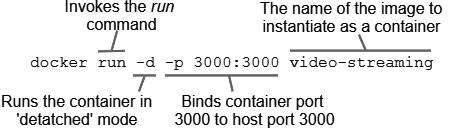
The microservice we are building is a simple video streaming service. Streaming video might sound difficult and it is something that could become very complicated in a real production application. However we are starting with something that’s much simpler and you might be surprised at just how little code we actually need to create this.
az login
We can view a list of all subscriptions with this command:

This is an excerpt from Manning's book Learn Docker in a Month of Lunches.
cd ./folder-list

 # build for the native architecture - Intel/AMD:
 docker image build -t diamol/ch16-folder-list:linux-amd64 -f ./Dockerfile.linux-amd64 .

 # build for Arm 64-bit:
 docker image build -t diamol/ch16-folder-list:linux-arm64 -f ./Dockerfile.linux-arm64 --platform linux/arm64 .

 # and for Arm 32-bit
 docker image build -t diamol/ch16-folder-list:linux-arm -f ./Dockerfile.linux-arm --platform linux/arm .

 # run all the containers and verify the output:
 docker container run diamol/ch16-folder-list:linux-amd64
 docker container run diamol/ch16-folder-list:linux-arm64
 docker container run diamol/ch16-folder-list:linux-arm

This is an excerpt from Manning's book Docker in Practice, Second Edition.
Listing 1.2. docker run output for todoapp
$ docker run -i -t -p 8000:8000 --name example1 todoapp                   #1
 npm install
npm info it worked if it ends with ok
npm info using npm@2.14.4
npm info using node@v4.1.1
npm info prestart todomvc-swarm@0.0.1

> todomvc-swarm@0.0.1 prestart /todo                                      #2
 > make all

npm install
npm info it worked if it ends with ok
npm info using npm@2.14.4
npm info using node@v4.1.1
npm WARN package.json todomvc-swarm@0.0.1 No repository field.
npm WARN package.json todomvc-swarm@0.0.1 license should be a valid SPDX
 license expression
npm info preinstall todomvc-swarm@0.0.1
npm info package.json statics@0.1.0 license should be a valid SPDX license
 expression
npm info package.json react-tools@0.11.2 No license field.
npm info package.json react@0.11.2 No license field.
npm info package.json node-
     jsx@0.11.0 license should be a valid SPDX license expression
npm info package.json ws@0.4.32 No license field.
npm info build /todo
npm info linkStuff todomvc-swarm@0.0.1
npm info install todomvc-swarm@0.0.1
npm info postinstall todomvc-swarm@0.0.1
npm info prepublish todomvc-swarm@0.0.1
npm info ok
if [ ! -e dist/ ]; then mkdir dist; fi
cp node_modules/react/dist/react.min.js dist/react.min.js

LocalTodoApp.js:9:    // TODO: default english version
LocalTodoApp.js:84:            fwdList = this.host.get('/TodoList#'+listId);
 // TODO fn+id sig
TodoApp.js:117:        // TODO scroll into view
TodoApp.js:176:        if (i>=list.length()) { i=list.length()-1; } // TODO
 .length
local.html:30:    <!-- TODO 2-split, 3-split -->
model/TodoList.js:29:        // TODO one op - repeated spec? long spec?
view/Footer.jsx:61:        // TODO: show the entry's metadata
view/Footer.jsx:80:            todoList.addObject(new TodoItem()); // TODO
 create default
view/Header.jsx:25:        // TODO list some meaningful header (apart from the
 id)

npm info start todomvc-swarm@0.0.1

> todomvc-swarm@0.0.1 start /todo
> node TodoAppServer.js

Swarm server started port 8000
^Cshutting down http-server...                                            #3
 closing swarm host...
swarm host closed
npm info lifecycle todomvc-swarm@0.0.1~poststart: todomvc-swarm@0.0.1
npm info ok
$ docker ps -a                                                            #4
 CONTAINER ID  IMAGE    COMMAND      CREATED        STATUS PORTS  NAMES
b9db5ada0461  todoapp  "npm start"  2 minutes ago  Exited (0) 2 minutes ago
        example1
$ docker start example1                                                   #5
 example1
$ docker ps
CONTAINER ID  IMAGE    COMMAND      CREATED        STATUS
 PORTS                   NAMES
b9db5ada0461  todoapp  "npm start"  8 minutes ago  Up 10 seconds
 0.0.0.0:8000->8000/tcp  example1                                      #6
 $ docker diff example1                                                   #7
 C /root
C /root/.npm
C /root/.npm/_locks
C /root/.npm/anonymous-cli-metrics.json
C /todo                                                                   #8
 A /todo/.swarm                                                           #9
 A /todo/.swarm/_log
A /todo/dist
A /todo/dist/LocalTodoApp.app.js
A /todo/dist/TodoApp.app.js
A /todo/dist/react.min.js
C /todo/node_modules
Next, you run the node package manager’s install command (npm). This will set up the dependencies for your application. You aren’t interested in the output in this example, so you redirect it to /dev/null.
Building with Dockerfiles takes advantage of a useful caching feature: steps that have already been built are only rebuilt if the commands have changed. The next listing shows the output of a rebuild of the to-do app from chapter 1.

This is an excerpt from Manning's book Docker in Action.
docker run –d --name webConflict nginx:latest docker logs webConflict #1 docker exec webConflict nginx -g 'daemon off;' #2 #1 - The output should be empty #2 - Start a second nginx process in the same containerThe last command should display output like:
docker run –d --name webConflict nginx:latest docker logs webConflict #1 docker exec webConflict nginx -g 'daemon off;' #2 #1 - The output should be empty #2 - Start a second nginx process in the same container