concept item in category ejb
This is an excerpt from Manning's book EJB 3 in Action, Second Edition.
The next example shows a possible implementation of the ActionBazaar ordering workflow using a bean named DefaultOrderProcessor. As you can see, DefaultOrderProcessor roughly models a workflow. You’ve ordered the methods so that you can easily visualize how the component might be invoked from a set of JSF pages, each implementing a stage of the ordering process. The setBidder and setItem methods are invoked by the presentation tier at the very beginning of the workflow, presumably when the user clicks the Order button. The bidder is likely the currently logged-in user, and the item is likely the current item selected to be ordered. In the setBidder method, the component retrieves the shipping and billing histories of the bidder and stores them away behind the scenes along with the bidder. In the setItem method, the shipping and billing choices are filtered down to what’s applicable to the current item. The current item is also stored away into an instance variable for use farther down the workflow.
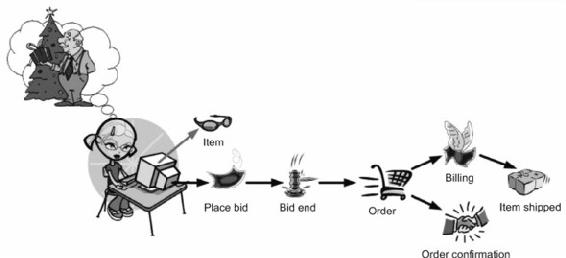
For the purposes of introducing EJB 3, let’s focus on a small subset of ActionBazaar functionality in this chapter—starting from bidding on an item and ending with ordering the item won. This set of application functionality is shown in figure 2.1.
Figure 2.1. A chain of representative ActionBazaar functionality used to examine a cross-section of EJB 3. The bidder bids on a desired item, wins the item, orders it, and instantaneously receives confirmation. Parallel with the order confirmation, the user is billed for the item. Upon successful receipt of payment, the seller ships the item.
The functionality represented in figure 2.1 encompasses the essentials of ActionBazaar. The major functionalities not covered are posting an item for sale, browsing items, and searching for items. We’ll save these pieces of functionality for later. This includes presenting the entire domain model, which we’ll discuss in chapter 9 when we start talking about domain modeling and persistence using JPA 2.
The chain of actions in figure 2.1 starts with the user deciding to place a bid on an item. The user, Jenny, spots the perfect Christmas gift for her grandpa and quickly puts down a starting bid of $5.00. After the timed auction ends, the highest bidder wins the item. Jenny gets lucky and no one else bids on the item, so she wins it for the grand sum of $5.00. As the winning bidder, Jenny is allowed to order the item from the seller, Joe. An order includes all the items you’ve come to expect from online merchants—shipping information, billing details, a total bill with calculated shipping and handling costs, and so on. Persuasive Jenny gets her mom to foot the bill with her credit card and has the order shipped directly to her grandpa’s address. Not unlike many e-businesses, such as Amazon.com and eBay, ActionBazaar doesn’t make the user wait for the billing process to finish before confirming an order. Instead, the order is confirmed as soon as it’s received and the billing process is started in parallel in the background. Jenny gets an order confirmation as soon as she clicks the Order button. Although Jenny doesn’t realize it, the process to charge her mom’s credit card starts in the background as she’s receiving the confirmation. After the billing process is finished, both Jenny and Joe are sent email notifications. Having been notified of the receipt of the money for the order, Joe ships the item, just in time for Jenny’s grandpa to get it before Christmas!
@NamedNativeQuery(
  name = "findUserWithMoreItems",
  query = "SELECT user_id , first_name , last_name,
              birth_date
   FROM   users
   WHERE user_id IN
  ( SELECT seller_id
   FROM items
   GROUP BY seller_id   HAVING COUNT(*) > ?)",
   hints = {@QueryHint(name = "toplink.cache-usage",
      value="DoNotCheckCache")},
  resultClass = actionbazaar.persistence.User.class)