concept JNDI in category ejb

This is an excerpt from Manning's book EJB 3 in Action, Second Edition.
Isn’t that great? The @EJB annotation
transparently “injects” the HelloUserBean EJB into the annotated variable. The @EJB annotation reads the type and name of the EJB and looks it up from JNDI under the hood. All EJB components are automatically registered with JNDI while being deployed. Note that you can still use JNDI lookups where they’re unavoidable. For example, to dynamically look up your bean, you could use code like this:
In essence, JNDI is the JDBC of naming and directory services. Just as JDBC provides a standard Java API to access all kinds of databases, JNDI standardizes naming and directory service access. If you’ve ever used your computer’s file system, you already know what a naming and directory service is. A computer’s file system is a basic directory service. You can use the file system to browse and look up a file you have on your desktop. If you’ve ever used a Lightweight Directory Access Protocol (LDAP) or Microsoft Active Directory (AD) server, you’re familiar with a more robust naming and directory service.
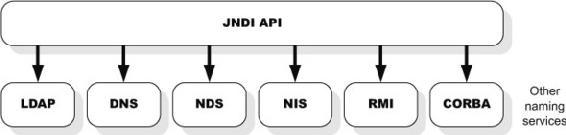
As figure 5.2 shows, JNDI provides a uniform abstraction over a number of different naming services, such as LDAP, Domain Naming System (DNS), Network Information Service (NIS), Novell Directory Services (NDS), remote method invocation (RMI), Common Object Request Broker Architecture (CORBA), and so on. Once you get an instance of a JNDI context, you can use it to locate resources in any underlying naming service available to the context. Under the hood, JNDI negotiates with each available naming service, giving the service the name of the resource; then the service uses that name to figure out where the resource actually resides.
Environment entries are specified in the deployment descriptor and are accessible via JNDI. The ActionBazaar censorship flag could be specified like this:
<env-entry>
  <env-entry-name>censorship</env-entry-name>
  <env-entry-type>java.lang.Boolean</env-entry-type>
  <env-entry-value>true</env-entry-value>
</env-entry>


!@%STYLE%@!
{"css":"{\"css\": \"font-weight: bold;\"}","target":"[[{\"line\":1,\"ch\":2},{\"line\":1,\"ch\":45}],[{\"line\":2,\"ch\":2},{\"line\":2,\"ch\":52}],[{\"line\":3,\"ch\":2},{\"line\":3,\"ch\":41}]]"}
!@%STYLE%@!
Environment entries are essentially meant to be robust application constants and support a relatively small range of data types. Specifically, the values of the <env-entry-type> tag are limited to these Java types: String, Character, Byte, Short, Integer, Long, Boolean, Double, and Float. Because environment entries are accessible via JNDI they can be injected by name. As you might gather, the data types of the environment entry and the injected variable must be compatible. Otherwise, the container throws a runtime exception while attempting injection. Note that if you have complex DI-based configuration needs, you should most likely look into CDI. CDI is covered in more depth in section 5.3.8.