concept collaborative filtering in category elasticsearch

This is an excerpt from Manning's book Relevant Search: With applications for Solr and Elasticsearch.
To better understand how collaborative filtering works, let’s look at a simple example using a co-occurrence counting approach. The following algorithm is a bit naïve; we intend it to be introductory and don’t recommend that you implement it in a production system. Nevertheless, it builds up a basic understanding of collaborative filtering, and it removes the feeling that collaborative filtering is somehow magic. As you’ll see, many machine-learning algorithms are based on simple ideas, such as counting the number of times that items are purchased together.
In the previous section, we demonstrated how to build a simple recommendation system. But we’re supposed to be talking about personalized search! In this section, we return to search and explain how the output of collaborative filtering can be used to build a more personalized search experience. We also point out some pitfalls to be aware of.
You can pull collaborative filtering information into search in several ways. The three strategies demonstrated here are related in that they take a standard, text-only search and incorporate collaborative filtering as a multiplicative boost. Here’s how it works: Consider an example base query in which you take the user’s query “Summer Dress” and search across two fields, title and description, as shown in the following listing.
Listing 11.1. Base query
{ "query": { "multi_match": { "query": "summer dress", "fields": ["title^3", "description"]}}}Given this base query, you incorporate collaborative filtering by applying a multiplicative boost using a function_score query, as shown next.
For behavior-based personalization, you narrow your focus. Rather than considering user demographics, search histories, and profiles, you focus solely on user-item interactions. In this section, you’ll look specifically at user-item purchases. In principle, interactions can be anything: item views, saves, ratings, shares, and so forth. Given the data set of user-item interactions, you’ll use collaborative filtering to reveal hidden relationships among users and the items.
Collaborative filtering comes in many forms, from simple counting-based methods (which we introduce in a moment) to highly sophisticated matrix decomposition techniques (which are outside of the scope of this book). But no matter the technique, the input to collaborative filtering and the output from collaborative filtering follow the same pattern.
Figure 11.3. No matter the method used, collaborative filtering typically takes a user-to-item matrix and returns a model to quickly find user-to-item or item-to-item affinity.
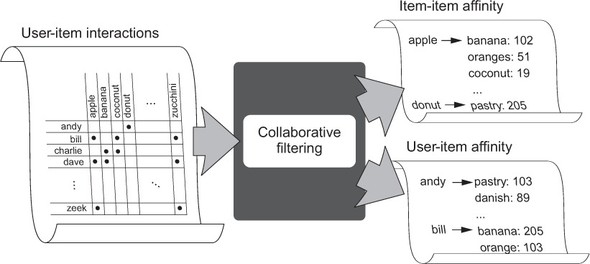
Collaborative filtering outputs a model that can find which items are most closely associated to a given user or item. So, given a source item such as apple, the collaborative filtering model might return a list of items, such as banana, orange, or grape, for which apple has a high affinity. Additionally, each item includes an affinity score. Consider the output banana:132, orange:32, grape:11. Here banana has a relatively high affinity for apple, grape a low affinity.