concept entry in category elixir
This is an excerpt from Manning's book Elixir in Action.
For now, let’s start with this simple interface. First you have to decide on the internal data representation. In the preceding snippet, you can see that the primary use case is finding all entries for a single date. Therefore, using a map seems like a reasonable initial approach. You’ll use dates as keys, with values being lists of entries for given dates. With this in mind, the implementation of the
new/0function is straightforward.Listing 4.1 Initializing a to-do list (simple_todo.ex)
defmodule TodoList do
  def new(), do: %{}
  ...
end
Next you have to implement the
add_entry/3function. This function expects a to-do list (which you know is a map) and has to add the entry to the list under a given key (date). Of course, it’s possible that no entries for that date exist, so you have to cover that case as well. As it turns out, this can be done with a single call to the functionMap.update/4.Listing 4.2 Adding an entry (simple_todo.ex)
defmodule TodoList do
  ...
  def add_entry(todo_list, date, title) do
    Map.update(
      todo_list,
      date,
 [title],    #1
 fn titles -> [title | titles] end    #2
    )
  end
  ...
end

#1   Initial value
#2   Updater lambda
As explained in section 2.4.6, the most common way of doing this in Elixir is to use maps, with field names stored as keys of the atom type. The following snippet demonstrates how you can create and use an
entryinstance:iex(1)> entry = %{date: ~D[2018-12-19], title: "Dentist"} iex(2)> entry.date ~D[2018-12-19] iex(3)> entry.title "Dentist"You can immediately adapt your code to represent entries with maps. As it turns out, this change is extremely simple. All you need to do is change the code of the
TodoList.add_entryfunction to accept two arguments: a to-do list instance, and a map that describes an entry. The new version is presented in the following listing.Listing 4.6 Representing entries with maps (todo_entry_map.ex)
defmodule TodoList do
  ...
  def add_entry(todo_list, entry) do
    MultiDict.add(todo_list, entry.date, entry)
  end
  ...
end
That was simple! You assume an entry is a map and add it to
MultiDict, using its date field as a key.

This is an excerpt from Manning's book Elixir in Action.
You can immediately adapt your code to represent entries with maps. As it turns out, this change is extremely simple. All you need to do is change the code of the TodoList .add_entry function to accept two arguments: a to-do list instance, and a map that describes an entry. The new version is presented in the following listing.
Listing 4.6. Representing entries with maps (todo_entry_map.ex)
defmodule TodoList do ... def add_entry(todo_list, entry) do MultiDict.add(todo_list, entry.date, entry) end ... endThat was simple! You assume an entry is a map and add it to MultiDict using its date field as a key.
1. The function will accept an ID value of the entry and an updater lambda. This will work similarly to HashDict.update. The lambda will receive the original entry and return its modified version.
2. The function will accept an entry map. If an entry with the same ID exists in the entries collection, it will be replaced.
Another issue is what to do if an entry with a given ID doesn’t exist. You can either do nothing or raise an error. In this example, you’ll use option 1, the updater lambda approach, and you won’t raise an error if the entry with a given ID doesn’t exist.
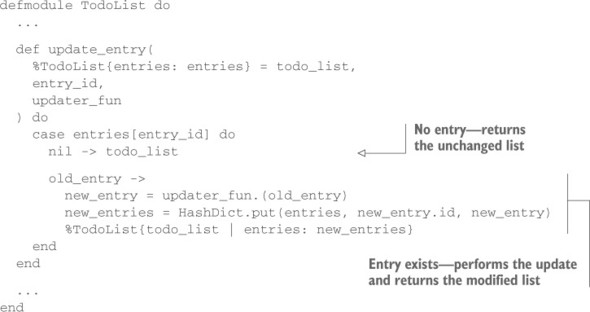
Let’s break down what happens here. In the argument specifiers for update_entry/3, you pattern-match a TodoList struct and store its entries field in a separate value. In addition, the entire instance is taken into a todo_list variable.
Then you look up the entry with the given ID and branch on the result. If the entry doesn’t exist, you return the original version of the list.
You can go a step further and assert that the ID value of the entry has not been changed in the lambda:
old_entry_id = old_entry.id
new_entry = %{id: ^old_entry_id} = updater_fun.(old_entry)
Here you store the ID of the old entry in the separate variable. Then you check that the result of the updater lambda has that same ID value. Recall from chapter 3 that ^var in a pattern match means you’re matching on the value of the variable. In this case, you match on the value stored in the old_entry_id variable. If the updater lambda returns an entry with a different ID, the match will fail, and an error will be raised.