concept context in category ember

This is an excerpt from Manning's book Ember.js in Action.
Wrapping the {{name}} expression inside a {{linkTo}} expression is the most common way to transition the user from one route to another as the user navigates your Ember.js application. The {{linkTo}} expression takes one or two attributes: the first is the name of the route to transition to; the second attribute specifies the context that the {{linkTo}} expression injects into the linked-to route.
A block expression also can have a different context than its enclosing template. Let’s continue with our book catalog analogy, and assume that you’re using the context shown in the following listing.
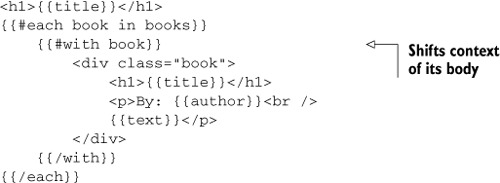
Even though Handlebars.js supports using paths in its expressions, it can sometimes be handy to be able to shorten a long path (for example, book.author.address.postcode) by using the {{with}} block expression to shift the context for a subsection of the template. Consider the following code, which is an updated version of listing 4.6.
The {{action}} expression is, as its name indicates, used to fire DOM actions on HTML elements. The action is forwarded into the template’s target, which will most likely be the current route’s controller. The {{action}} expression takes three arguments: a name, a context, and a set of options. Any event triggered via the {{action}} expression will have preventDefault() called on it.