concept current run loop in category ember

This is an excerpt from Manning's book Ember.js in Action.
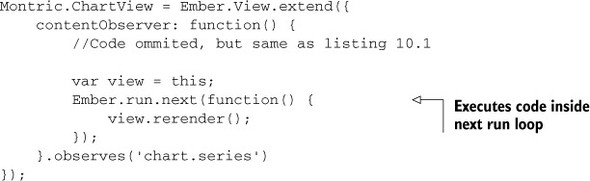
Sometimes you want to make sure that your code executes just after the current run loop has finished. You can do this in two ways. You can either use the special Ember.run.next() function call, or you can schedule the code to run in 1 millisecond by using the Ember.run.later() function call. In the following listing, you’re revisiting the chart series observer from listing 10.1, which has been updated to use Ember.run.next().
As you can see, the code in this listing is the same as that shown in listing 10.1, with the exception that you replace the call to Ember.run() with Ember.run.next(). The signatures for both functions are the same. The effect of this change is that the rerendering of the view waits until all bindings and observers have been properly propagated and until all DOM updates that are scheduled in the current run loop have been properly carried out. This might be useful if you want to apply animations to a DOM element after it renders, and if you need to schedule an event to occur after the events in the Render, AfterRender, and Destroy queues have been carried out.
Executing code in the current run loop is the most common run loop scheduling task you’ll write. Using Ember.run, Ember.js places the given callback into the default Actions queue.
Listing 10.1 shows an example of attaching a piece of code to the current run loop. In this example, you’re implementing part of a view that draws a line chart. Specifically, you’re looking at an observer that listens for changes to the view’s chart.series property. Because the server side doesn’t always return a specific color for each series in the line chart, you need to tell the charting library (Rickshaw) to pick a new color from its palette and attach that color to each series without a color already defined. After a new color is added to the series, you need to redraw the view.