concept Ember Container in category ember

This is an excerpt from Manning's book Ember.js in Action.
By specifying the two routes inside Blog.Router.map, you tell Ember.js to instantiate three routes, three controllers, and three views using three templates. By default, Ember.js uses a standard naming convention to find and instantiate these objects automatically. If you follow these naming conventions, no extra boilerplate code is required to wire everything together. Ember Router injects the instantiated objects into the Ember Container, which you’ll look at near the end of this chapter.
The concept of dependency injection is a whole book in itself. In short, the Ember Container allows you to assign objects to common names. After an object is registered, it’s possible to inject it into properties on other objects that are also registered into the Ember Container.
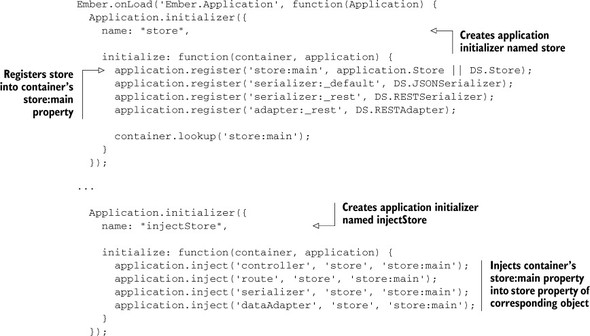
Ember Data is an excellent example of a use case that uses the Ember Container to its advantage. The following listing shows the initialization of Ember Data.
I don’t expect you to follow the logic behind the application initializers here. The point of this example is to give you a sense of the power behind the Ember Container. At the top of the listing, you call application.register(), which takes two arguments. The first argument is a string that represents the unique name that the object you’re registering will be tied to. The second argument is the object or class that you want to register with the container. In this case, you register a DS.Store class into the container as store:main.