concept test in category ember

This is an excerpt from Manning's book Ember.js in Action.
The first type of test that you’ll likely want to set up is a unit test, so we’ll start by looking more closely at QUnit.
Because running tests that require a browser makes testing in a continuous integration (CI) environment particularly difficult, you’ll use PhantomJS to execute the tests in headless mode. PhantomJS allows you to run tests without a browser, so structuring your tests to work with PhantomJS makes testing in a CI environment easier to set up.
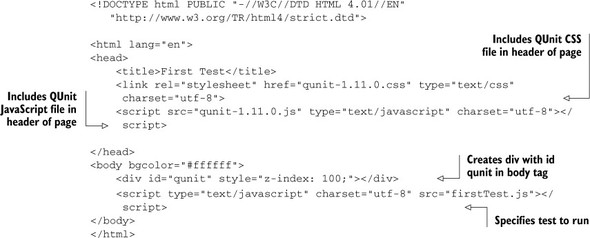
To verify that QUnit is set up and working properly, you’ll create a small unit test. To get started, download the QUnit JavaScript file as well as the QUnit CSS file from the QUnit website, http://qunitjs.com. Create a new HTML file named firstTest.html, which bootstraps QUnit and enables you to execute tests. Place firstTest.html in a new directory on your hard drive. The content of firstTest.html is shown in the following listing.
As you can see, QUnit uses an HTML page to set up the test. Inside this page, you need to include both the QUnit CSS and JavaScript files along with a div element that QUnit uses to display the test results. All the tests that you want to run via the same HTML file need to be specified inside the body tag of your HTML page.
Nothing special is going on in any of the five tests, and the code should be readable and easy to understand. In the first test, you use the ok assert, which passes if the first argument is truthy, meaning that it’s not null, undefined, or false. Here you’re testing whether you were able to retrieve a valid non-null instance of Montric.ApplicationController. This test is an important addition to your test module; debugging the cause of failing tests will be easier if you first rule out any problems with retrieving the controller upon which the rest of the tests are built.