concept Book entity class in category entity framework

This is an excerpt from Manning's book Entity Framework Core in Action, SE.
I’ve shown you the
Bookentity class, which has links to three other entity classes:PriceOffer,Review, andBookAuthor. I now want to explain how you, as a developer, can access the data behind these relationships. You can load data in four ways: eager loading, explicit loading, select loading, and lazy loading.But before I cover these approaches, you need to be aware that EF Core won’t load any relationships in an entity class unless you ask it to. If you load a Book class, each of the relationship properties in the
Bookentity class (Promotion,Reviews, andAuthorsLink) will benullby default.
Listing 3.3 Adding a Book entity class also adds any linked entity classes
var book = new Book                     #A
{                                       #A
    Title = "Test Book",                #A
    PublishedOn = DateTime.Today,       #A
    Reviews = new List<Review>()        #B
    {
        new Review                         #C
        {                                  #C
            NumStars = 5,                  #C
            Comment = "Great test book!",  #C
            VoterName = "Mr U Test"        #C
        }
    }
};

context.Add(book);                      #D
context.SaveChanges();                  #E
This is an excerpt from Manning's book Entity Framework Core in Action.
Listing B.2 shows the
Bookentity class with the Reviews collection set up for lazy loading
I’ve shown you the
Bookentity class, which has links to three other entity classes:PriceOffer,Review, andBookAuthor. I now want to explain how you, as a developer, can access the data behind these relationships. You can load data in three ways: eager loading, explicit loading, select loading, and lazy loading (in EF Core 2.1).But before I cover these approaches, you need to be aware that EF Core won’t load any relationships in an entity class unless you ask it to. If you load a
Bookclass, each of the relationship properties in theBookentity class (Promotion,Reviews, andAuthorsLink) will benullby default.
Listing 3.3 Adding a
Bookentity class also adds any linked entity classesvar book = new Book #1 { #1 Title = "Test Book", #1 PublishedOn = DateTime.Today, #1 Reviews = new List<Review>() #2 { new Review #3 { #3 NumStars = 5, #3 Comment = "Great test book!", #3 VoterName = "Mr U Test" #3 } } }; context.Add(book); #4 context.SaveChanges(); #5 #1 Creates the book with the title “Test Book” #2 Creates a new collection of reviews #3 Adds one review with its content #4 Uses the Add method to add the book to the application’s DbContext property, Books #5 Calls the SaveChanges method from the application’s DbContext to update the database. It finds a new Book, which has a collection containing one new Review, and it then adds both to the database.
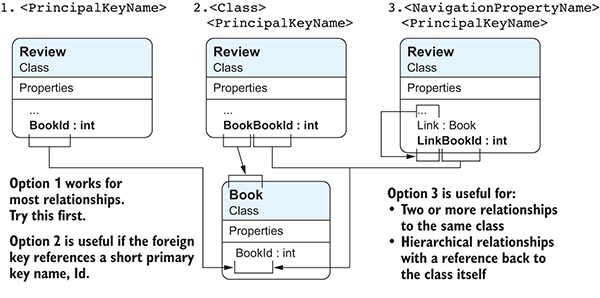
Figure 7.2 Three options for a foreign key referring to the
Bookentity class’s primary key. These allow you to use a unique name for your foreign key, from which EF Core can work out which primary key this relationship refers to.