concept database provider in category entity framework
This is an excerpt from Manning's book Entity Framework Core in Action.
From the start, EF Core was designed to handle SQL and NoSQL databases, but in the first releases, no NoSQL database providers were available. In EF Core 2.1, you’ll find a preview version of a database provider for Azure’s Cosmos NoSQL database. The idea is that you can use all the same tools and techniques you’ve used in EF Core on relational databases and apply them to NoSQL, nonrelational databases.
The LINQ query db.Books.AsNoTracking().Include(a => a.Author)accesses theDbSet<Book>property in the application’s DbContext and adds a.Include(a => a.Author)at the end to ask that the Author parts of the relationship are loaded too. This is converted by the database provider into an SQL command to access the database. The resulting SQL is cached to avoid the cost of retranslation if the same database access is used again.EF Core tries to be as efficient as possible on database accesses. In this case, it combines the two tables it needs to read, Books and Author, into one big table so that it can do the job in one database access. The following listing shows the SQL created by EF Core and the database provider.
Listing 1.3 SQL command produced to read Books and Author
SELECT [b].[BookId],
[b].[AuthorId],
[b].[Description],
[b].[PublishedOn],
[b].[Title],
[a].[AuthorId],
[a].[Name],
[a].[WebUrl]
FROM [Books] AS [b]
INNER JOIN [Author] AS [a] ON
[b].[AuthorId] = [a].[AuthorId]
EF Core tries to be as efficient as possible on database accesses. In this case, it combines the two tables it needs to read, Books and Author, into one big table so that it can do the job in one database access. The following listing shows the SQL created by EF Core and the database provider.
Listing 2.2 Creating an instance of the application’s DbContext to access the database
const string connection =
     "Data Source=(localdb)\\mssqllocaldb;"+    #1
     "Database=EfCoreInActionDb.Chapter02;"+    #1
     "Integrated Security=True;";    #1
var optionsBuilder =    #2
    new DbContextOptionsBuilder    #2
           <EfCoreContext>();    #2
optionsBuilder.UseSqlServer(connection);    #3
var options = optionsBuilder.Options;
using (var context = new EfCoreContext(options))  #4
{
    var bookCount = context.Books.Count();    #5
    //... etc.

#1   The connection string, with its format dictated by the sort of database provider and hosting you’re using
#2   You need an EF Core DbContextOptionsBuilder<> instance to be able to set the options you need.
#3   You’re accessing an SQL Server database and using the UseSqlServer method from the Microsoft.EntityFrameworkCore.SqlServer library, and this method needs the database connection string.
#4   This creates the all-important EfCoreContext using the options you’ve set up. You use a using statement because the DbContext is disposable.
#5   Uses the DbContext to find out the number of books in the database
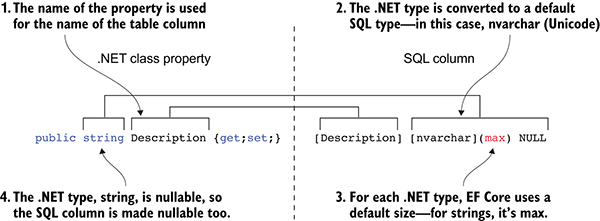
Figure 6.3 The application of the By Convention rules to define an SQL column. The type of the property is converted by the database provider to the equivalent SQL type, whereas the name of the property is used for the name of the column.