concept date in category entity framework
This is an excerpt from Manning's book Entity Framework Core in Action.
The filtering created for the book app is a bit more complex than the sorting we just covered. That’s because you get the customer to first select the type of filter they want and then select the actual filter value. The filter value for Votes is easy: it’s a set of fixed values (4 or above, 3 or above, and so on). But to filter by Date, you need to find the dates of the publications to put into the drop-down list.
Listing 2.13 The
FilterBooksByquery object methodpublic static IQueryable<BookListDto> FilterBooksBy( this IQueryable<BookListDto> books, BooksFilterBy filterBy, string filterValue) #1 { if (string.IsNullOrEmpty(filterValue)) #2 return books; #2 switch (filterBy) { case BooksFilterBy.NoFilter: #3 return books; #3 case BooksFilterBy.ByVotes: var filterVote = int.Parse(filterValue); #4 return books.Where(x => #4 x.ReviewsAverageVotes > filterVote); #4 case BooksFilterBy.ByPublicationYear: if (filterValue == AllBooksNotPublishedString) #5 return books.Where( #5 x => x.PublishedOn > DateTime.UtcNow); #5 var filterYear = int.Parse(filterValue); #6 return books.Where( #6 x => x.PublishedOn.Year == filterYear #6 && x.PublishedOn <= DateTime.UtcNow); #6 default: throw new ArgumentOutOfRangeException (nameof(filterBy), filterBy, null); } } #1 The method is given both the type of filter and the user-selected filter value. #2 If the filter value isn't set, it returns IQueryable with no change. #3 Same for no filter selected—it returns IQueryable with no change. #4 The filter by votes is a value and above; if there are no reviews for a book, the ReviewsAverageVotes property will be null, and the test always returns false. #5 If coming soon was picked, you return only books not yet published. #6 If you have a specific year, you filter on that. You also remove future books (in case the user chose this year’s date).
Figure 5.6 The two stages in changing the publication date of a book. The
GETstage calls theGetOriginalmethod to show the user the book and its current publication date. ThePOSTstage then calls theUpdateBookmethod with the user set date.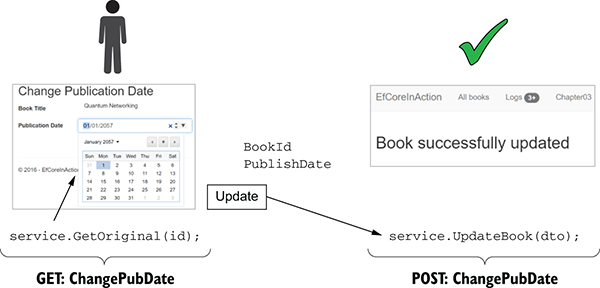
A well-designed database has only one copy of a piece of data. Having two copies could mean that those pieces of data can get out of step. This is why your default query calculates the average votes every time, as someone might have just added a new review to a book and so changed its average votes value. I’m sure you’ve heard the software term caching, in which a calculation that takes a long time is calculated once, and used again and again. Well, you want to cache some data in your database, but the problem is, what happens when your cached value gets out-of-date?
The good news is, EF Core has excellent tools to help you keep a cached value in the database up-to-date. The bad news is, doing this requires extra development work, and you must think carefully to make sure the cache doesn’t get out of step with the database’s calculated value. This extra work and complexity is the price you pay if you want to improve your application’s intrinsic performance.
This is an excerpt from Manning's book Entity Framework 4 in Action.
The datatype mismatch refers to the different data representations and constraints that are used in the object and relational worlds. When you add a column to a table in a database, you have to decide what datatype to assign to it. Any modern database supports char, varchar, int, decimal, date, and so on. When it comes to classes, the situation is different. Database int and bigint types fit naturally into .NET Int32 and Int64 types, but other database types don’t have an exact match in .NET.
var result = from o in orders
             where o.OrderDate.Date == DateTime.Now.Date
             select o;