concept DI in category entity framework

This is an excerpt from Manning's book Entity Framework Core in Action, SE.
#A This interface is needed when registering this class in DI. You use DI in chapter 5 when building the ASP.NET Core BookApp
You can work around these two problems in several ways, such as overriding the
OnConfigurationmethod in the application’s DbContext (covered in section 5.11.1). But DI is a better way of handling this, and that’s what ASP.NET Core uses. Using a slightly different set of commands, you can tell the DI provider how to create your application’s DbContext, a process called registering a service, and then ask the DI for an instance of your application’s DbContext anywhere in ASP.NET Core’s system that supports DI.
Setting up the code to configure the application’s DbContext is a little complicated and can hide the DI part. My first example of DI in ASP.NET Core, shown in figure 5.2, uses a simple class called
Demo, which you’ll use in an ASP.NET controller. This example is useful later, when I show you how to use DI to make your code simpler to call. Figure 5.2 An example of a class called Demo being inserted via DI into a controller’s constructor. The code on the right registers your IDemo/Demo pair, and the AddControllersWithViews command registers all the ASP.NET Core controllers. When ASP.NET Core needs the HomeController (used for showing Html pages), then DI will create the HomeController. Because the HomeController needs an IDemo instance DI will create one and inject it into the HomeController ‘s constructor.
This is an excerpt from Manning's book Entity Framework Core in Action.
You can work around these two problems in several ways, such as overriding the
OnConfigurationmethod in the application’s DbContext (covered in section 5.11.1). But DI is a better way of handling this, and that’s what ASP.NET Core uses. Using a slightly different set of commands, you can tell the DI provider how to create your application’s DbContext, a process called registering a service, and then ask the DI for an instance of your application’s DbContext anywhere in ASP.NET Core’s system that supports DI.
Setting up the code to configure the application’s DbContext is a little complicated and can hide the DI part. My first example of DI in ASP.NET Core, shown in figure 5.2, uses a simple class called
Demo, which you’ll use in an ASP.NET controller. This example is useful later, when I show you how to use DI to make your code simpler to call.Figure 5.2 An example of a class called
Demobeing inserted via DI into a controller’s constructor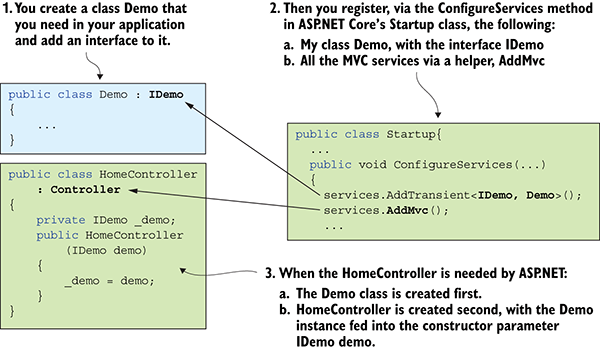
Listing 5.3 The
Indexaction in theHomeControllerdisplays the list of bookspublic class HomeController : Controller { private readonly EfCoreContext _context; public HomeController(EfCoreContext context) #1 { #1 _context = context; #1 } #1 public IActionResult Index #2 (SortFilterPageOptions options) #3 { var listService = #4 new ListBooksService(_context); #4 var bookList = listService #5 .SortFilterPage(options) #5 .ToList(); #6 return View(new BookListCombinedDto #7 (options, bookList)); #7 } #1 The application’s DbContext is provided by ASP.NET Core via DI. #2 ASP.NET action, called when the homepage is called up by the user #3 The options parameter is filled with sort, filter, page options via the URL. #4 ListBooksService is created using the application’s DbContext from the private field _context. #5 The SortFilterPage method is called with the sort, filter, page options provided. #6 The ToList() method executes the LINQ commands, which causes EF Core to translate the LINQ into the appropriate SQL to access the database and return the result as a list. #7 Sends the options (to fill in the controls at the top of the page) and the list of BookListDtos to display as an HTML table