concept entity in category entity framework

This is an excerpt from Manning's book Entity Framework Core in Action, SE.
When you want to update a specific entity and need to read it in using its primary key there are a few options. I used to use the Find
command, but after some digging I now recommend SingleOrDefault
because its quicker than the Find
command. But I should point two useful things about the Find method:
·   The Find
method checks the current application’s DbContext to see whether the required entity instance has already been loaded, which can save an access to the database. But if the entity isn’t in the application’s DbContext the load will be slower because of this extra check.
This is an excerpt from Manning's book Entity Framework Core in Action.
In this book, I use the Query Object pattern (see section 2.6) to produce tailored code for each query. I show in section 10.4 how to use a DDD approach to updating entities. Using these two approaches lets you build well-performing queries quickly, without resorting to lazy loading. See my article at http://mng.bz/5VH2 for a more detailed discussion on this topic.
Figure 9.1 shows the change of
Stateof the entity instance, without any relationships, as it’s added, modified, and deleted from the database. This gives a good overview of the values that theStateof an entity can have.Figure 9.1 The code on the left uses all the standard ways of creating, updating, and deleting data in a database. The right column, Entity state, shows the EF Core
stateof the entity as it moves through each of these stages.
Listing 9.5 Using
TrackGraphto set each entity’sStateandIsModifiedflagsvar book = … untracked book with all relationships #1 context.ChangeTracker.TrackGraph(book, e => #2 { e.Entry.State = EntityState.Unchanged; #3 if (e.Entry.Entity is Author) #4 { e.Entry.Property("Name").IsModified = true; #5 } }); context.SaveChanges(); #6 #1 Expects an untracked book with its relationships #2 Calls ChangeTracker.TrackGraph, which takes an entity instance and an Action, which in this case you define via a lambda. The Action method is called once on each entity in the graph of entities. #3 If the method sets the state to any value other than Disconnected, the entity will become tracked by EF Core. #4 Here you want to set only the Name property of the Author entity to Modified, so you check if the entity is of type Author. #5 Sets the IsModified flag on the Name property. This also sets the State of the entity to Modified. #6 Calls SaveChanges, which finds that only the Name property of the Author entity has been marked as changed; creates the optimal SQL to update the Name column in the Authors table.

This is an excerpt from Manning's book Entity Framework 4 in Action.
This design might or might not have optimized the overall database design, but from a developer’s perspective it was a painful choice. This design affected the design of the object model too. The AddressInfo class was originally a mere container of data, but it was turned into an entity that has its own correspondence with a database table. The consequences were a higher number of lines of code to maintain the new database table, and slower performance because SQL commands increased (updating a customer meant updating its personal data and address). Forewarned is forearmed.
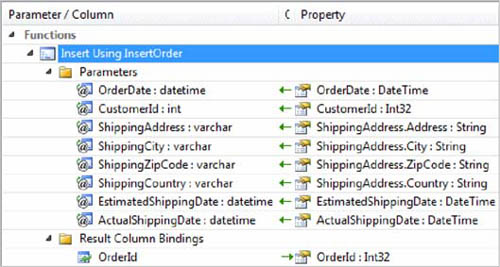
Listing 10.8. Mapping an entity to persistence stored procedures in the MSL
<EntityTypeMapping TypeName="OrderITModel.Order"> <ModificationFunctionMapping> <InsertFunction FunctionName="OrderITModel.Store.InsertOrder"> <ScalarProperty Name="ActualShippingDate" ParameterName="ActualShippingDate" /> <ScalarProperty Name="EstimatedShippingDate" ParameterName="EstimatedShippingDate" /> <ScalarProperty Name="CustomerId" ParameterName="CustomerId" /> <ScalarProperty Name="OrderDate" ParameterName="OrderDate" /> <ComplexProperty Name="ShippingAddress" TypeName="OrderITModel.AddressInfo"> <ScalarProperty Name="Country" ParameterName="ShippingCountry" /> <ScalarProperty Name="ZipCode" ParameterName="ShippingZipCode" /> <ScalarProperty Name="City" ParameterName="ShippingCity" /> <ScalarProperty Name="Address" ParameterName="ShippingAddress" /> </ComplexProperty> <ResultBinding Name="OrderId" ColumnName="OrderId" /> </InsertFunction> <UpdateFunction ...> ... </UpdateFunction> <DeleteFunction ...> ... </DeleteFunction> </ModificationFunctionMapping> </EntityTypeMapping>In the EntityTypeMapping element related to the Order type, you include a ModificationFunctionMapping element. It instructs Entity Framework that the persistence of the entity is delegated to the stored procedure defined in this element. Inside EntityTypeMapping, you define three nodes that correspond to the insert, update, and delete stored procedures: InsertFunction, UpdateFunction, DeleteFunction (the order isn’t important).
A standalone entity is easy to map. The situation gets more complicated when the entity is part of an inheritance hierarchy. In the next section, we’ll investigate such a scenario.
When a stored procedure’s results don’t match up with an entity, you can resort to complex types. You can create a new complex type in the designer (as you learned how to do in chapter 2) and map the stored procedure’s results to it. The materialization mechanism is the same as is used for entities; there are no differences.
There are three possible situations where the stored procedure’s results don’t align with an entity: