concept Entity Framework in category entity framework

This is an excerpt from Manning's book Entity Framework Core in Action, SE.
EF Core isn’t the first version of Entity Framework; an existing, non-Core, Entity Framework library is known as EF6.x. EF Core starts with years of experience built into it via feedback from these previous versions, 4 to 6.x. It has kept the same type of interface as EF6.x but has major changes underneath, such as the ability to handle nonrelational databases, which EF6.x wasn’t designed to do. I started using EF when it supported spatial data (EF5) used it a lot, which allows me to significantly improvements in EF Core over EF6.x, both in features and performance.
This book is for software developers already using EF Core, as well as developers who’ve never used Entity Framework, and seasoned EF6.x developers who want to move over to EF Core. I do assume that you’re familiar with .NET development using C# and that you have at least some idea of what relational databases are. I don’t assume you know how to write Structured Query Language (SQL), the language used by a majority of relational databases, because EF Core can do most of that for you. But I do show the SQL that EF Core produces, because it helps you understand what’s going on; using some of the EF Core advanced features requires you to have SQL knowledge, but the book provides plenty of diagrams to help you along the way.
This is an excerpt from Manning's book Entity Framework Core in Action.
Entity Framework in general is a feature-rich implementation of an O/RM, and EF Core continues this trend. It allows you to write complex data access code covering most of the database features you’ll want to use. As I have moved through ADO.NET, LINQ to SQL, EF 4 to 6, and now EF Core, I believe this is already a great O/RM.
This is an excerpt from Manning's book Entity Framework 4 in Action.
There are plenty of O/RM tools on the market, both free and commercial. So far, NHibernate has been the most powerful and stable one. The stability was inherited from its parent (NHibernate is the .NET port of Hibernate, which is an O/RM tool written in Java, available since 2001), and the fact that it’s an open source project has encouraged its adoption. Now, its leadership is being threatened by the new version of Entity Framework.
In the next section, we’ll look at why Entity Framework is a valid alternative.
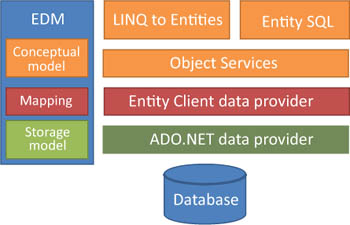
Entity Framework is a complex piece of software. Its overall architecture consists of several components, each fulfilling a specific task. Figure 1.9 illustrates Entity Framework’s key components and gives an idea of where each fits in.
Figure 1.9. The overall architecture of Entity Framework: The query languages lie on top of Object Services, which relies on Entity Client to interact with the database. Entity Client uses the standard ADO.NET providers to physically communicate with the database. The EDM is a layer that’s referenced by all the others and is used by them to obtain metadata about classes.
The preceding features are shared by all O/RM tools available. Now let’s look at the benefits that Entity Framework adds to your development phase.
It’s included in the .NET Framework. Microsoft fully supports Entity Framework and guarantees bug fixes, documentation, and improvements at a pace its competitors can’t keep up with. Often, customers choose Entity Framework instead of NHibernate because Entity Framework’s presence in the .NET Framework reassures them about the overall quality of the project. What’s more, because the .NET Framework is free, Entity Framework is free as well.
Listing 19.2. Inserting customers and suppliers using Entity Framework
using (OrderITEntities ctx = new OrderITEntities()) { for (int i = 0; i < 500; i++) { Customer c = CreateCustomer(); ctx.Companies.AddObject(c); Supplier s = CreateSupplier(); ctx.Companies.AddObject(s); } _watch.Start("Insert 500 customers and 500 suppliers with EF"); ctx.SaveChanges(); _watch.Stop(); }