concept method in category entity framework

This is an excerpt from Manning's book Entity Framework Core in Action, SE.
A method can become an extension method if (a) it’s declared in a static class, (b) the method is static, and (c) the first parameter has the keyword
thisin front of it.Because the
MapBookToDtomethod usesIQueryable<T>for both input and output, the LINQ commands inside the method aren't executed. The input can be theDbSet<Books>property in the application’s DbContext, or another source of typeIQueryable<Book>. Also, theMapBookToDtomethod’s output can be fed into a method that takesIQueryable<BookListDto>and returnsIQueryable<BookListDto>, in which case the LINQ commands are still not executed.
Listing 3.13 ChangePriceOfferService class with a method to handle each stage
public class ChangePriceOfferService : IChangePriceOfferService
{
    private readonly EfCoreContext _context;

    public Book OrgBook { get; private set; }

    public ChangePriceOfferService(EfCoreContext context)
    {
        _context = context;
    }

    public PriceOffer GetOriginal(int id)      #A
    {
        OrgBook = _context.Books               #B
            .Include(r => r.Promotion)         #B
            .Single(k => k.BookId == id);      #B

        return OrgBook?.Promotion              #C
            ?? new PriceOffer                  #C
               {                               #C
                   BookId = id,                #C
                   NewPrice = OrgBook.Price    #C
               };                              #C
    }

    public Book AddUpdatePriceOffer(PriceOffer promotion)  #D
    {
        var book = _context.Books               #E
            .Include(r => r.Promotion)          #E
            .Single(k => k.BookId               #E
                  == promotion.BookId);         #E
        if (book.Promotion == null)             #F
        {
            book.Promotion = promotion;         #G
        }
        else
        {
            book.Promotion.NewPrice             #H
                = promotion.NewPrice;           #H
            book.Promotion.PromotionalText      #H
                = promotion.PromotionalText;    #H
        }
        _context.SaveChanges();                 #I
        return book;                            #J
    }
}
Option 1 isn’t normally a good idea because the method will be so hard to understand and refactor. It also has problems if parts of the business logic are used elsewhere, because you could break the DRY (don’t repeat yourself) software principle.
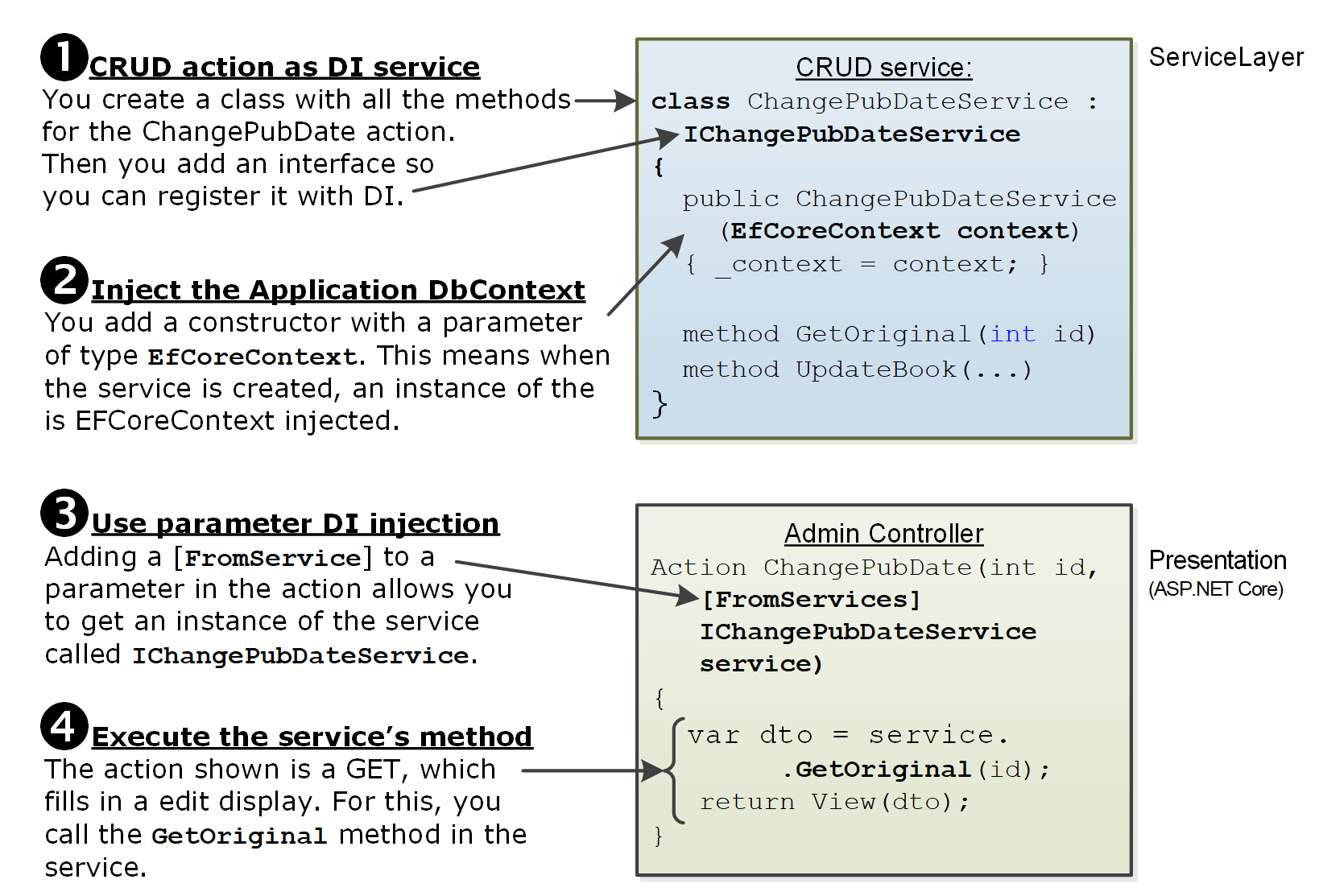
Figure 5.7 Using DI to provide a service often requires the DI provider to create other classes first. In this fairly simple case, there are at least four levels of DI. The Admin Controller’s ChangePubDate is called (bottom rectangle), then the [FromServices] attribute on one of the method’s parameters tells the DI provider to create an instance of the ChangePubDateService.class. The ChangePubDateService (top rectangle) class requires an instance of the EfCoreDbContext class, so the DI provider must create that too. Which in turn requires the DbContextOptions<EfCoreContext> to be created to be able to create the EfCoreDbContext class.
This is an excerpt from Manning's book Entity Framework Core in Action.
So far in this book, you’ve seen a wide range of EF Core commands available to you. This chapter digs deeper into the properties and methods available in the application’s DbContext. In some cases, I provide a more detailed explanation of commands in chapter 3, such as the
Add,Update, andDeletemethods. I also introduce methods that haven’t been covered, such asAttachandTrackGraph, that give you options on how to change the database data.The EF Core’s
DbContextclass has a wide range of methods and features. After dealing with the methods and properties relating to adding, updating, or deleting data, you’ll explore numerous other topics. We’ll start with an overview of the three properties in theDbContextclass, with pointers to coverage of their related features.
Listing 9.2
NotificationEntityhelper class thatNotifyEntityinheritspublic class NotificationEntity : INotifyPropertyChanged { public event PropertyChangedEventHandler PropertyChanged; protected void SetWithNotify<T>(T value, ref T field, [CallerMemberName] string propertyName = "") #1 { if (!Object.Equals(field, value)) #2 { field = value; #3 PropertyChanged?.Invoke(this, #4 new PropertyChangedEventArgs(propertyName)); #5 } } } #1 Automatically gets the propertyName by using System.Runtime.CompilerServices #2 Only if the field and the value are different do you set the field and raise the event. #3 Sets the field to the new value #4 Invokes the PropertyChanged event, but using ?. to stop the method from failing when the new entity is created and the PropertyChangedEventHandler hasn’t been filled in by EF Core… #5 ... with the name of the property
Figure 13.6 The
Bookentity class (top left) and theReviewentity class (top right) are “locked down.” The properties that the class doesn’t want anyone else to change have private setters, and theReviewsnavigational collection is of typeIEnumerable<T>to stop adding or removing reviews from the collection. TheAddReviewmethod (bottom) in theBookentity class is the only way a developer can add a newReview. When a newReviewis added, the method also recalculates the cache properties,AverageVotesandReviewsCount.
This is an excerpt from Manning's book Entity Framework 4 in Action.
Using classes is a natural choice for most applications today. Classes are the foundation of object-oriented programming. They easily represent data, perform actions, publish events, and so on. From a data organization point of view, classes express data through methods and properties (which, in the end, are special methods).
In the method declaration
, you have to indicate what type the method must be attached to. In VB, this is accomplished by specifying in the first parameter the class that’s extended, and adding the Extension attribute to the method. In C#, you only need to add the this keyword before the extended type without using any attribute. If the method accepts other parameters, they must be added after the first parameter; if the type isn’t first, you’ll get a compile-time error. There is one caveat in both languages: in VB, an extension method can be defined only in a module; and in C#, it must be defined in a static class, and the method must be static too.