concept NoSQL database in category entity framework
This is an excerpt from Manning's book Entity Framework Core in Action.
Personally, I’m pleased to see EF Core supporting NoSQL databases, because NoSQL databases have a role to play in modern applications. In section 14.2, I use a CQRS architecture with a NoSQL database handling the read-side to provide improved performance and scalability over an SQL-only implementation. Allowing EF Core to work with both SQL and NoSQL databases is a significant step forward.
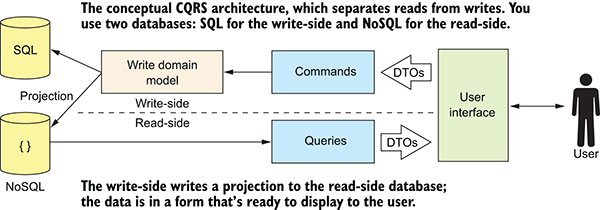
You’ll then look at the Command Query Responsibility Segregation (CQRS) architecture discussed at the end of the preceding chapter (see section 13.6). We’ll spend quite a bit of time on this, as it’s a useful architecture and its implementation highlights advanced features inside EF Core. You’ll also add a NoSQL database to the mix to end up with a high-performance version of our original book-selling site application. It might not challenge Amazon, but it’s still pretty fast for a single-instance ASP.NET Core application. This application is available on the book’s Git repo branch Chapter14 as well as on a live site at http://cqrsravendb.efcoreinaction.com/.
Figure 14.1 A conceptual view of a CQRS architecture with an SQL database for the write side, and a NoSQL database for the read side. A write takes a bit more work because it writes to two databases—the normal SQL database and the new NoSQL read-side database. In this arrangement, the read-side database is writing in the exact format needed by the user, so reads are fast.
Listing 14.5 The code inside one of the overridden
SaveChangespublic override int SaveChanges() #1 { var detectedChanges = BookChangeInfo #2 .FindBookChanges(ChangeTracker.Entries()); #2 var result = base.SaveChanges(); #3 var booksChanged = BookChange #4 .FindChangedBooks(detectedChanges); #4 var updater = new ApplyChangeToNoSql #5 (this, _updater); #5 updater.UpdateNoSql(booksChanged); #6 return result; } #1 You must override all the SaveChanges methods (sync and async) to make sure you capture all updates to the database. #2 This stage is all about detecting the State of all the tracked entities before they get cleared by the call to the base SaveChanges. #3 Now you can call the base SaveChanges, as you have all the State information. #4 Multiple changes may have been made to a single Book. This stage combines them so you send only one update to the NoSQL database. #5 The DataLayer oversees the projection of the SQL database into the form that the NoSQL database needs it in. The NoSQL provides an updater method, via the constructor, which will do the update. #6 Applies any updates to the NoSQL database