concept transaction in category entity framework
This is an excerpt from Manning's book Entity Framework Core in Action.
This leaves option 3, which is possible because of a feature in EF Core (and most relational databases) called transactions. When EF Core starts a relational database transaction, the database creates an explicit, local transaction. This has two effects. First, any writes to the database are hidden from other database users until you call the transaction
Commitcommand. Second, if you decide you don’t want the database writes (say, because the business logic has an error), you can discard all database writes done in the transaction by calling the transactionRollBackcommand.
Here’s the code for the new transactional BizRunner, which starts a transaction on the application’s DbContext before calling any of the business logic.
Listing 4.11
RunnerTransact2WriteDbruns two business logic stages in seriespublic class RunnerTransact2WriteDb<TIn, TPass, TOut> #1 where TOut : class #2 { private readonly IBizAction<TIn, TPass> #3 _actionPart1; #3 private readonly IBizAction<TPass, TOut> #3 _actionPart2; #3 private readonly EfCoreContext _context; public IImmutableList<ValidationResult> #4 Errors { get; private set; } #4 public bool HasErrors => Errors.Any(); #4 public RunnerTransact2WriteDb( #5 EfCoreContext context, #5 IBizAction<TIn, TPass> actionPart1, #5 IBizAction<TPass, TOut> actionPart2) #5 { _context = context; _actionPart1 = actionPart1; _actionPart2 = actionPart2; } public TOut RunAction(TIn dataIn) { using (var transaction = #6 _context.Database.BeginTransaction()) #6 { var passResult = RunPart( #7 _actionPart1, dataIn); #7 if (HasErrors) return null; #8 var result = RunPart( #9 _actionPart2, passResult); #9 if (!HasErrors) #10 { #10 transaction.Commit(); #10 } #10 return result; #11 } } private TPartOut RunPart<TPartIn, TPartOut>( #12 IBizAction<TPartIn, TPartOut> bizPart, #12 TPartIn dataIn) #12 where TPartOut : class { var result = bizPart.Action(dataIn); #13 Errors = bizPart.Errors; #13 if (!HasErrors) #14 { #14 _context.SaveChanges(); #14 } #14 return result; #15 } } #1 Generic RunnerTransact2WriteDb takes three types: the initial input, the class passed from Part1 to Part2, and the final output. #2 Because the BizRunner returns null if an error occurs, you have to say that the TOut type must be a class. #3 Defines the generic BizAction for the two business logic parts #4 Holds the error information returned from the last business logic code that ran #5 Takes the two instances of the business logic, and the application DbContext that the business logic is using. #6 You start the transaction on the application’s DbContext within a using statement. When it exits the using statement, unless Commit has been called, it’ll RollBack any changes. #7 You use a private method, RunPart, to run the first business part. #8 If errors exist, you return null (the rollback is handled by the dispose of the transection). #9 Because the first part of the business logic was successful, you run the second part of the business logic. #10 If no errors occur, you commit the transaction to the database. #11 Returns the result from the last business logic #12 A private method that handles running each part of the business logic. #13 Runs the business logic and copies the business logic’s Errors property to the local Errors property #14 If the business logic was successful, you call SaveChanges to apply any add/update/delete commands to the transaction. #15 Returns the result that the business logic returned
This is an excerpt from Manning's book Entity Framework 4 in Action.
In this scenario, the persistence of the object graph requires four inserts in the database. They must be executed in a transactional context to ensure that everything works in an all-or-nothing way. In listing 2.4, there is no trace of a transaction, nor of any other database-related code. The missing plumbing is boxed inside the SaveChanges method, leaving you only the burden of invoking it.
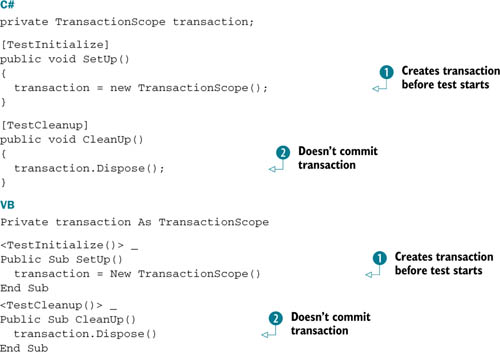
Using transaction = New TransactionScope()
  ...
  scope.Complete()
End Using
Some years ago, transactions would have been a complex subject. Nowadays, thanks to the DTC component and the TransactionScope class, controlling them is incredibly simple.