concept router in category express
This is an excerpt from Manning's book Express in Action: Writing, building, and testing Node.js applications.
Express applications can often be pretty small, even fitting in just one file. As your applications get larger, though, you’ll want to break them up into multiple folders and files. Express is unopinionated about how you scale your app, but it provides one important feature that’s super helpful: subapplications. In Express lingo, these miniapplications are called routers.
Express allows you to define routers that can be used in larger applications. Writing these subapplications is almost exactly like writing normal-sized ones, but it allows you to further compartmentalize your app into smaller pieces. You might have an administration panel in your app, and that can function differently from the rest of your app. You could put the admin panel code side-by-side with the rest of your middleware and routes, but you can also create a subapplication for your admin panel. Figure 1.5 shows how an Express application might be broken up with routers.
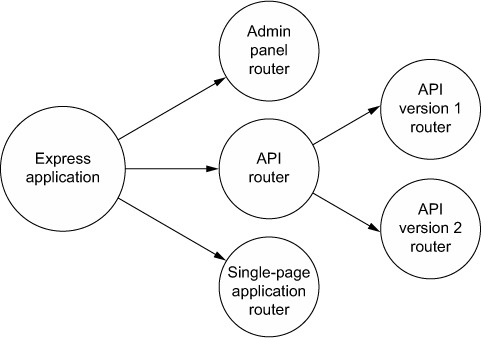
A router is an isolated instance of middleware and routes. Routers can be thought of as “mini” applications only capable of performing middleware and routing. Every express application has a built-in app router.
Routers behave like middleware and can be “.use()d” by the app in other routers. In other words, routers allow you to chunk your big app into numerous mini-apps that you can later put together. For small apps, this might be overkill, but as soon as you think, “This app.js file is getting big,” it’s time to think about breaking down your app with routers. Listing 5.7 shows how to use routers from the main app file.
Routers really shine when you’re building a bigger application. I don’t want to build a huge application in this section, so this example will have some spots that you should fill in with your imagination.
As you can see, you use your API router just like middleware because routers are basically middleware. In this case, any URL that starts with /api will be sent straight to your router. That means that /api/users and /api/message will use your router code, but something like /about/celinedion will not.
