concept state in category f#

This is an excerpt from Manning's book Get Programming with F#: A guide for .NET developers.
F# also emphasises composition rather than inheritance to achieve reuse, with support for this baked into the language. Functions are the main component of reuse, rather than classes – so expect to write small functions that “plug together” to create powerful abstractions. Individual functions are nearly always easier to understand and reason about than entire sets of methods coupled together through state in a class, just like writing stateless functions are much easier to reason about than those that are stateful. As such, making changes to existing code is much easier to do with a greater degree of confidence. Here’s a simple example of how we might build behaviours into more powerful ones in C# and F#. Again, in C# I’ve deliberately kept things at the method level, but also think about the effort required when trying to compose more complex sorts of behaviours across classes and objects.
Here’s another one. You’ve working on a team and have designed a business object class. Your colleague has written code to operate on that object. You call that code, supplying an object, and then carry on. Sometime later, you notice a bug in your application: the state of the business object no longer looks as it did previously!
It turns out that the code your colleague wrote modified a property on the object without you realizing it. You made that property public only so that you could change it; you didn’t intend or expect other bits of code to change the state of it! You fix the problem by making an interface for the type that exposes the bits that are “really” public on the type, and give that to consumers instead.

This is an excerpt from Manning's book F# Deep Dives.
In addition to implementing game logic, the next aspect is building server-side components that handle coordination between computations and distribution of state. The server side of a social game is a typical example of coordination-intensive computation, as discussed in the earlier “Writing efficient and scalable software” section. We won’t attempt to explain here why the agent-based programming model is so powerful; you can find the details in chapter 10, which is written by the author of the preceding quote.
One of the main difficulties of implementing user interfaces in games is the gap between event-based user interfaces—nowadays the prevalent type—and frame-based simulation frameworks used for games. User interfaces are typically designed to react to user input and remain asleep between user actions. Frame-based simulation divides time into small, discrete quantities and repeatedly updates the state of the simulation.
User interaction often requires a number of steps to be spread out over longer periods, up to several seconds or minutes. Long interactions have to be broken into smaller units of work, which are chained and executed in each frame. Keeping track of the current unit of work and its data commonly leads to condition-heavy code with lots of partially initialized variables. F# offers a number of elegant solutions in the form of discriminated unions and asynchronous computations. Table 1 compares explicit state using mutable variables and enum in C# to implicit state using async computations in F#, which are shorter.
Listing 5. Implementing the data access layer
module SharpVille.Server.DAL

open System
open System.Collections.Generic
open SharpVille.Model

type IStateRepository =
    abstract member Get     : PlayerId  -> State option
    abstract member Put     : State     -> unit

type ISessionStore =
    abstract member Get     : SessionId -> Session option
    abstract member Put     : Session   -> unit

type InMemoryStateRepo () =
    let states = new Dictionary<PlayerId, State>()

    interface IStateRepository with
        member this.Get(playerId) =
            match states.TryGetValue playerId with
            | true, x -> Some x
            | _       -> None
        member this.Put(state)  = states.[state.PlayerId] <- state

type InMemorySessionStore () =
    let sessions = new Dictionary<SessionId, Session>()

    interface ISessionStore with
        member this.Get(sessionId) =
            match sessions.TryGetValue sessionId with
            | true, x -> Some x
            | _       -> None
        member this.Put(session)  = sessions.[session.Id] <- session
This is an excerpt from Manning's book Real-World Functional Programming with Examples in F# and C#.
According to these conditions, our GameCharacter class is immutable. All its fields are marked using the readonly modifier ❶. int is an immutable primitive type and Point is an immutable value type. When a field is read-only, it can be set only when creating the object, so we can set the health and location of the character only in the constructor ❷. This means we can’t modify the state of the object once it’s initialized. So, what can we do when an operation needs to modify the state of the game character?
You can see the answer when you look at the HitByShooting method ❸. It implements a reaction to a shot being fired in the game. It uses the CalculateHealth method (not shown in the sample) to calculate the new health of the character. In an imperative style, it would then update the state of the character, but that’s not possible because the type is immutable. Instead, the method creates a new GameCharacter instance to represent the modified character and returns it as a result.
At this point, you know how to write an application that reacts to events in C#, and we’ve seen that the same technique can be used in F# as well. The pattern is to register a callback function (or a method) with the event; when the event occurs, the callback function is executed. This can react to the event, perhaps updating the state of the application or making changes to the UI.
A typical imperative implementation would use a mutable flag specifying whether we’re currently drawing and a mutable variable to store the last location where the user pressed the mouse button. Then we’d handle MouseDown and MouseMove events and modify the state appropriately when one of them fired. We can check whether the drawing is finished in the handler for the MouseMove event, because it also carries information about the state of mouse buttons. Alternatively, we could use the MouseUp button, but the first version will be easier to start with. If we think of the control flow of the application, we can see that it’s quite simple. You can see a flowchart that shows it in figure 16.5.
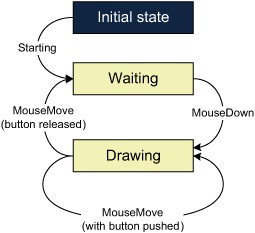
In this book, we won’t introduce parallelism in the demo, but you can get a more evolved version of the sample from the book’s website. In that version we make the application online and allow multiple users to connect to a single server and collaborate on drawing a single image. In that case, the state can be modified by the user, but also concurrently by a message coming from a network communication. If we decided to use mutable state, we’d have to carefully use locking, which would complicate the code. When we store the state using the technique we’ll introduce in this section we won’t have to do a single change—the code as we’ll write it is perfectly thread-safe, which is quite important nowadays.