concept formatter in category flex

This is an excerpt from Manning's book Hello! Flex 4.
This code creates an ArrayCollection of Tasks
and assigns it to _tasks. This ArrayCollection is used by both the Halo List
and DataGrid
classes, so changes to its sort (made when clicking on the DataGrid header) affect both views. Next, we create formatTask
and formatDate
functions, which are the labelFunctions of the List
of the DataGrid respectively. These functions are responsible for formatting whatever data from the individual row in the data provider is desired into a string that will be presented in the DataGrid column or List. Finally, note the use of a DateFormatter
to format dates—and that it uses the unambiguous YYYY-MM-DD format, not the MM/DD/YYYY format, which is mistakable for DD/MM/YYYY. The next chapter covers formatters at great length, so for now just know that formatters are useful components that simplify the task of formatting data.
In this chapter, you’ll learn how to use the formatters and validators that make building data entry forms in Flex such a pleasure—well, at least compared to everywhere else. Flex formatters are used primarily to format data that’s being displayed to the user in controls like the DataGrid you saw in chapter 5. Flex formatters can also be used to take user input and turn it into correctly formatted input. Flex validators are used to validate user input and display validation messages when the user input isn’t correct.
The API documentation for formatters and validators is excellent in many regards; however, one area it has always been lousy at is showing how to use formatters and validators together on the same input controls that the user is using. There’s a good reason for this: it’s a bit tricky to do well! However, if you care about making your forms as usable as possible, this is the road you’ll inevitably end up going down. So, if you do, the time this chapter could save you should alone be worth the book price.
Next, note that when a Canadian postal code is entered for a US zip code, the validation error is displayed and the erroneous text isn’t cleared out by the formatter.
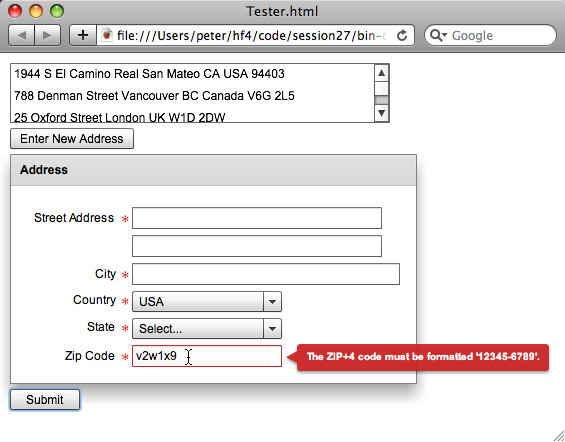
Once you’re done coding this example, you’ll be able to see the formatters in action, updating the zip codes to the 5+4 modern US style, and uppercasing Canadian postal codes and adding a space in them.