concept pie chart in category flex

This is an excerpt from Manning's book Flex on Java.
In chapter 8 we’ll be covering the Degrafa drawing API for Flex to create a pie chart for a sample application.
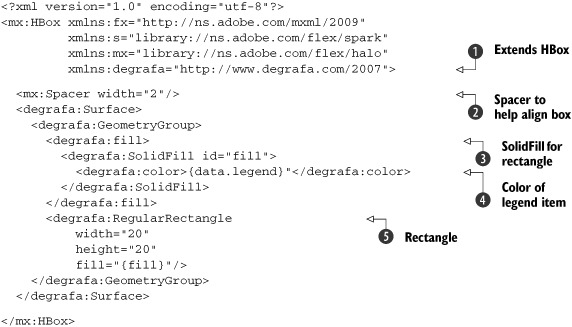
The next component you’re going to create is the custom ItemRenderer for the pie chart legend. This simple component will draw a colored box in the data grid cell to correspond with the colors of the pie chart.
The ItemRenderer is extending HBox
because all ItemRenderer objects for the DataGrid component must be halo components. Add a Spacer component
to help align the rectangle the way you want it. The SolidFill component
defines the fill color for the RegularRectangle
. Now that you’ve finished creating all the visual components for the pie chart, let’s move on to creating the Presenter. An implicitly defined variable is available to the ItemRenderer named data, which corresponds to the item in the dataProvider that you’re rendering. Use this implicit variable to set the color of the Fill object
, which is contained in the legend property of the object.
The component you’ll develop is a combination of a pie chart and a data grid, which will serve the purpose of a legend for the pie chart. Without this it may be difficult for someone looking at the chart to differentiate between data points on the graph. The pie chart will consist of the pie chart itself and another component for each of the slices that make up the chart. You’ll also develop a simple custom ItemRenderer for the chart legend to draw a simple box inside one of the cells in the data grid.