concept cart in category flutter

This is an excerpt from Manning's book Flutter in Action.
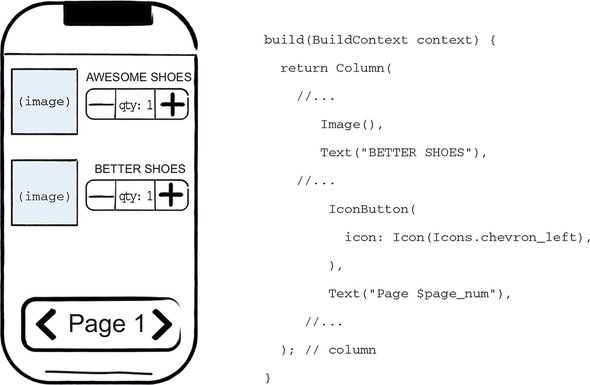
Suppose you’re building a shopping cart app. The app is pretty standard: it’ll list products, which you can add to a cart via Add and Remove buttons. Well, the list, the products, the buttons, the images, and everything else are widgets. Figure 1.3 shows how some of these widgets would be coded. Other than widgets, the only classes you’re likely to write are your own logic-specific classes, which aren’t related to Flutter.
Everything is widgets inside widgets inside widgets. Some widgets have state: for example, the quantity widgets that keep track of how many of each item to add to the cart. When a widget’s state changes, the framework is alerted, and it compares the new widget tree description to the previous description and changes only the widgets that are necessary. Looking at our cart example, when a user presses the + button on the quantity widget, it updates the internal state, which tells Flutter to repaint all widgets that depend on that state (in this case, the text widget). Figure 1.4 shows a wire frame of what the widgets might look like before and after pressing the “+” IconButton.
When an item is added to the cart, your code would also give the updated quantity to the stream controller. The controller “adds this number to a stream,” which effectively means that it sends a message to everyone who’s listening to the stream. Each time a listener is notified, it will call a callback that you provide. For example, the cart icon calls a function that changes the quantity and then calls set state, triggering a re-render. I don’t want to belabor this concept, but I’m going to give one more example, because it’s super important for the rest of this chapter, but it isn’t easy.
Inputs
- Add an item to the cart
- Remove an item from the cart
Outputs
- Get all items in cart
- Get number of items in the cart