concept everything in category flutter

This is an excerpt from Manning's book Flutter in Action.
As I mentioned, the project is currently in the technical preview stage. That means everything you learn about it is likely to change. More important, the goal of Flutter web is that it “just works.” So, in theory, if you learn everything in this book, once Flutter web becomes stable, you’ll already know everything you need to write a web app with Flutter.
“Everything is a widget” is a potentially misleading statement that you’ll see everywhere on the internet, including in the official documentation. This doesn’t mean there aren’t other objects in Flutter. Rather, it means that every piece of your app is a widget. Styles, animations, lists, text, buttons, and even pages are widgets. For example, there isn’t an object called “App” that defines the root of your application. The root of your application can technically be any widget. To be sure, there are other objects in the Flutter SDK (such as elements), which we’ll discuss later.
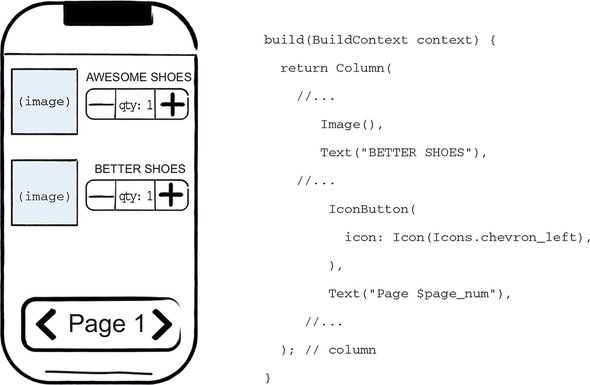
Suppose you’re building a shopping cart app. The app is pretty standard: it’ll list products, which you can add to a cart via Add and Remove buttons. Well, the list, the products, the buttons, the images, and everything else are widgets. Figure 1.3 shows how some of these widgets would be coded. Other than widgets, the only classes you’re likely to write are your own logic-specific classes, which aren’t related to Flutter.
Everything is widgets inside widgets inside widgets. Some widgets have state: for example, the quantity widgets that keep track of how many of each item to add to the cart. When a widget’s state changes, the framework is alerted, and it compares the new widget tree description to the previous description and changes only the widgets that are necessary. Looking at our cart example, when a user presses the + button on the quantity widget, it updates the internal state, which tells Flutter to repaint all widgets that depend on that state (in this case, the text widget). Figure 1.4 shows a wire frame of what the widgets might look like before and after pressing the “+” IconButton.
This is a core idea in Flutter. Everything is a widget. Again, this doesn’t mean that there aren’t other object types in Flutter—there are. Later in this book, I explore these other objects in depth, but as a developer you’ll rarely care about anything other than widgets. The point is that there aren’t models and view models or any other specific class type in Flutter.