concept number in category fortran
This is an excerpt from Manning's book Modern Fortran: Building efficient parallel applications.
Here’s a specific example. In my work, I develop numerical models of weather, ocean surface waves, and deep ocean circulation. Talking about it over the years, I found that most people didn’t know where weather forecasts came from. They had the idea that meteorologists would get together and draw a chart of what the weather would be like tomorrow, next week, or a month from now. This is only partly true. In reality, we use sophisticated numerical models that crunch a huge amount of numbers on computers the size of a warehouse. These models simulate the atmosphere to create an educated guess about what the weather will be like in the future. Meteorologists use the output of these models to create a meaningful weather map, like the one shown in figure 1.1. This map shows just a sliver of all the data that this model produces. The output size of a weather forecast like this is counted in hundreds of gigabytes.
In this section, you’ll learn how to explicitly format numbers and text for output to screen or files on disk. You’ve probably noticed that in most cases when we used
writestatements to display values on the screen, they produced output with somewhat awkward formatting and wide empty spaces between values. For example, in the previous section, we used list-directed I/O to read a few text and numerical variables from standard input and write them back to the screen:Hello 42 3.14159 #1 User typed: Hello 42 3.14159012 #2Notice the odd empty space between “Hello” and 42. Worse, when writing the number 3.14159 back to the screen, the program output “3.14159012,” which is a similar but nevertheless different number. What the heck is going on here?
Figure 6.3. Example of formatting a real number for output. The gray spaces represent empty spaces or blanks. The numbers underneath each output indicate character positions.

To format an integer, we’ll use the letter
ifollowed by the number of characters that will be reserved to display the value. For example, 34 formatted withi5will be output as ` 34` (three leading blanks, for a total of five characters). Optionally, you can specify the number of digits that must be output, even if they’re leading zeros. For example,i5.5applied to 34 will output00034.Figure 6.4. Example of formatting an integer for output. The gray spaces represent empty spaces or blanks. The numbers above each output indicate character positions.
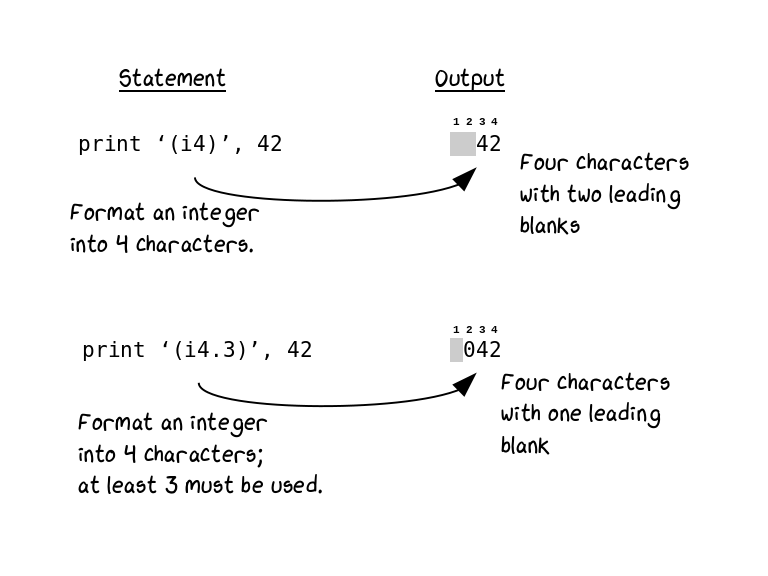
Formatting an integer is illustrated in figure 6.4. With
print '(i4)', 42, we make sure that the number 42 will be output using exactly four characters, no more and no less. As a result, we get ` 42` (two leading blanks) in the output. If the number we output was a three-digit number, such as 123, we’d end up with one leading blank. In the second example,print '(i4.3)', 42, we specify that we want four characters, with at least three of them being nonblank. Thus, for any one- or two-digit number, the compiler will add leading zeros to satisfy this requirement.