concept collection in category fusion

This is an excerpt from Manning's book Fusion in Action.
Parsing data is usually not the only thing you need to do to data on its way in to a system like Fusion. Whether you use a connector to pull data or you post raw data to a collection, you may have some transformations or enrichment you want to do to the data before it is indexed and stored.
Figure 6.5 The lifecycle of documents in timeseries partitioned collections.
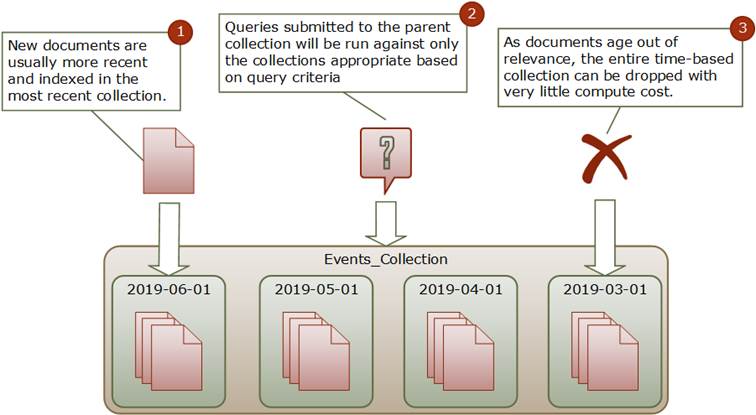
Figure 6.5 shows the lifecycle of data in a timeseries collection. New documents are added to the collection that applies to their timestamp. With most event data, this should be recent and will almost always go in the most recent collection. On a specified interval, a new collection will be created and all documents with a timestamp after the interval point will go into the new collection. This keeps index sizes low and makes performance of indexing new documents much faster than if all documents were in a single collection. After the specified lifetime for the data, the oldest collection can simply be dropped without having to pay the compute cost of deleting documents from an index.
One additional benefit of timeseries partitioned collections is in querying. Perhaps you want to keep monthly collections for 12 months, but most of your queries are typically limited to the most recent 30 days. In this case, Fusion is smart enough to only route the query to the appropriate time-based collections. The result is a much more performant query.
Create a collection in an existing app
Now that we have an empty app, the next step will be to add some objects to it for doing analysis. The first step here will be to create a collection to hold the data. Let’s go ahead and create a collection and call it eventsim. Once created, we'll configure it, and prepare it with a schema. Listing 6.2 shows the command you can use to create the collection.
Listing 6.2 Create an eventsim collection
$ curl -u admin:password1 -X POST -H "Content-type:application/json" -d '{
"id":"eventsim", #A
"solrParams":{
"numShards":3,
"maxShardsPerNode":3
}}' http://fusion-host:6764/api/apps/analytics/collections #B
Once the collection is created, the next step will be to enable the partition-by-time feature. Fusion requires you to supply the name of the field you will use as the timestamp for partitioning. This field will be required for all documents indexed to the collection so that Fusion knows which time-based collection the document belongs to. Listing 6.3 shows the command you can use to enable the feature.
Now that the collection is ready, we can create the indexing components so we can add the timeseries data to it. The data we will use will be JSON files in a zip archive. To use it, we will need to create a parser with an archive stage to unzip the file. The unzipped files contain JSON, so we’ll add a JSON stage to the parser as well.