concept change in category git

This is an excerpt from Manning's book Git in Practice.
To do anything useful in Git, you first need one or more commits in your repository. A commit is created from the changes to one or more files on disk. The typical workflow is that you’ll change the contents of files in a repository, review the diffs, add them to the index, create a new commit from the contents of the index, and repeat this cycle.
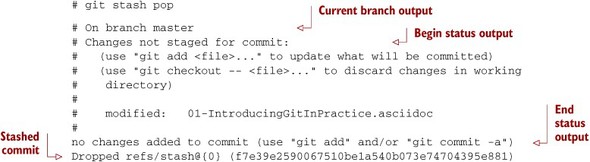
You’ve reapplied the changes from the last git stash save.
You may have stashed changes with the intent of popping them later, but then realize that you no longer wish to do so—the changes in the stack are now unnecessary, so you want to get rid of them all. You could do this by popping each change off the stack and then deleting it, but it would be handy to have a command that allows you to do this in a single step. Thankfully, git stash clear does just this.
Listing C.1. ~/.gitconfig
[include] path = ~/.gitconfig-user [color] # Colour terminal command output when possible. ui = auto [gist] # Open GitHub Gist in browser after submission. browse = true [push] # Push to the set upstream branch being tracked by default. default = simple [fetch] # Always prune when fetching (and pulling). prune = 1 [rerere] # Store and re-use manual conflict resolution changes. enabled = 1 [core] # Exclude everything this file. Used for general exclusions. excludesfile = ~/.gitignore # Set attributes on files. Used for general diff improvements. attributesfile = ~/.gitattributes [help] # Open Git help pages in the browser as HTML. format = web autocorrect = 1 [alias] ## 'New' Commands # Stage the changes in a given file. stage = !git add -u # Unstage the changes in a given file. unstage = reset HEAD -- # View the current changes in the staging area. staged = diff --cached # Print the name of the current branch. current-branch = symbolic-ref --short HEAD # Print the name of the current upstream tracking branch. upstream = !git config --get branch.$(git current-branch).remote \ || echo origin # Cherry-pick a commit with your signature. sign = cherry-pick --signoff # List all current SVN externals for this repository. svn-externals = !git svn show-externals | grep -x \\"[^#].*\\" # Create a git:// server of the current repository. # WARNING: this gives all users read/write access # without authentication (so only use on trusted networks). serve = !git daemon --reuseaddr --export-all --base-path=. \ --verbose ./.git # Merge a branch and commit a merge commit (even if one # isn't needed) noff = merge --no-ff # Merge a branch with a merge commit and resolve any conflicts # always using that branch's version rather than the current branch. theirs = !git noff -Xtheirs # Fetch all branches and rebase the current branch against # upstream/master. rebase-against-master = !git fetch --all \ && git rebase $(git upstream)/master # Push the current branch upstream to origin using the same branch # name for the remote branch. upstream-current-branch = !git push --set-upstream origin \ $(git current-branch) # Create a pull request on GitHub using the `gh` command. pull-request = !git upstream-current-branch && gh pull-request # Upstream the current branch to origin and create a pull request # on GitHub. upstream-and-pull-request = !git upstream-current-branch \ && git pull-request # Get the current diff but show differences between characters # instead of just the differences between lines. word-diff = diff --word-diff # Push the current branch and set it as the default upstream branch. push-and-set-upstream = push --set-upstream # Create a new branch by checking out another branch. checkout-as-new-branch = checkout -b # Rebase against origin/master and prompt for what operations # should be performed. interactively-rebase-against-origin-master = \ !git rebase --interactive origin/master # Show the commit log with a prettier, clearer history. pretty-one-line-log = log --graph --oneline --decorate # Commit any changes to files, squash them into the last commit # and update its date. fix-up-previous-commit = !git commit --all --amend \ --reuse-message=HEAD --date=\"$(date)\" #" # Checkout the staging branch and update it. pull-staging = !git checkout staging && git pull # Checkout the master branch and update it. pull-master = !git checkout master && git pull # Update the staging, master and current branches. pull-master-staging-and-current-branch = \ !BRANCH=$(git current-branch) && git fetch --all \ && git pull-staging && git pull-master && \ git checkout $BRANCH && git pull # Commit a work-in-progress commit (to use with # fix-up-previous-commit) work-in-progress = commit -a -m 'WIP' # Merge a branch with a merge commit and use the more time-consuming # patience diff algorithm patience = !git noff -Xpatience # Hard reset branch to the upstream version. hard-reset = !git reset --hard $(git upstream)/$(git current-branch) # Assume the specified file is unchanged to stop changes # being seen by Git assume = update-index --assume-unchanged # No longer assume a specified file remains unchanged unassume = update-index --no-assume-unchanged # List all files that are assumed to be unchanged assumed = !git ls-files -v | grep '^[hsmrck?]' | cut -c 3- ## Shortened 'New' Commands fahr = !git fetch --all && git hard-reset rem = !git rebase-against-master wip = !git work-in-progress pr = !git upstream-and-pull-request up = !git upstream-current-branch pm = !git pull-master-staging-and-current-branch fa = !git fetch --all w = !git word-diff u = !git push-and-set-upstream b = !git checkout-as-new-branch i = !git interactively-rebase-against-origin-master # `true` needed as the return status is wrong otherwise. l = !git pretty-one-line-log || true f = !git fix-up-previous-commit ## Shortened Existing Commands p = pull s = status --short --branch [instaweb] # Use the Ruby WEBRick library when creating a `git instaweb` # HTTP server. httpd = webrick [diff] # Use the OS X graphical three-way merge tool for graphical diffs. tool = opendiff # Use the slower but better patience diff algorithm algorithm = patience [diff "xml"] textconv = xmllint --format --recover [difftool "opendiff"] # Set the OS X opendiff command name. path = opendiff [merge] # Use the OS X graphical three-way merge tool for graphical merges. tool = opendiff [mergetool] # Don't prompt before opening the merge tool. prompt = false # Don't keep backups of the merge tool inputs. keepBackup = false # Don't keep the merge tool temporary input/output files. keepTemporaries = false [mergetool "opendiff"] # Use a script to setup opendiff correctly for Git merges. path = git-mergetool-opendiff [apply] # Cleanup whitespace by default when apply patches. whitespace = fix [url "git@github.com:"] # Always use GitHub SSH protocol to push. # Allows use of git:// for public repositories with push access pushInsteadOf = git://github.com/ [url "https://github.com/"] # Use HTTP for GitHub instead of git:// or git@ # Enable this in networks where git:// or git@ are blocked. #insteadOf = git://github.com/ #insteadOf = git@github.com: [url "git@github.com:"] # Use SSH for GitHub instead of https:// # Enable this in networks where https:// has issues. #insteadOf = https://github.com/ [url "git@gitorious.org:"] # Always use Gitorious SSH protocol to push. # Allows use of git:// for public repositories with push access # (which is often faster). pushInsteadOf = git://gitorious.org/ [credential] # Use OSX Keychain to store HTTP passwords. helper = osxkeychain [filter "media"] clean = git-media-clean %f smudge = git-media-smudge %f [gh] protocol = https