concept gh in category git
appears as: gh

This is an excerpt from Manning's book Git in Practice.
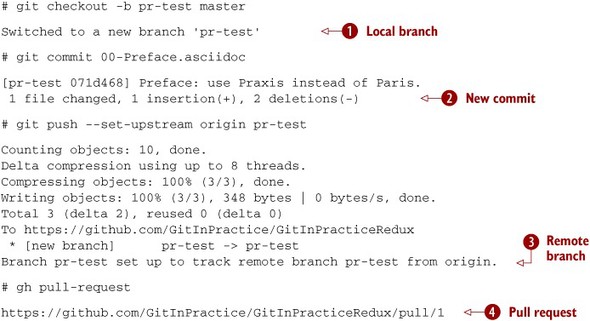
The gh command-line tool allows various interactions with GitHub by providing a wrapper on top of Git’s interface and adding new commands and improving the interaction of some Git commands with GitHub. For example, instead of running git clone https://github.com/GitInPractice/GitInPracticeRedux, you can run gh clone GitInPractice/GitInPracticeRedux to perform the same action of cloning a GitHub repository to your local machine.
Listing C.1. ~/.gitconfig
[include] path = ~/.gitconfig-user [color] # Colour terminal command output when possible. ui = auto [gist] # Open GitHub Gist in browser after submission. browse = true [push] # Push to the set upstream branch being tracked by default. default = simple [fetch] # Always prune when fetching (and pulling). prune = 1 [rerere] # Store and re-use manual conflict resolution changes. enabled = 1 [core] # Exclude everything this file. Used for general exclusions. excludesfile = ~/.gitignore # Set attributes on files. Used for general diff improvements. attributesfile = ~/.gitattributes [help] # Open Git help pages in the browser as HTML. format = web autocorrect = 1 [alias] ## 'New' Commands # Stage the changes in a given file. stage = !git add -u # Unstage the changes in a given file. unstage = reset HEAD -- # View the current changes in the staging area. staged = diff --cached # Print the name of the current branch. current-branch = symbolic-ref --short HEAD # Print the name of the current upstream tracking branch. upstream = !git config --get branch.$(git current-branch).remote \ || echo origin # Cherry-pick a commit with your signature. sign = cherry-pick --signoff # List all current SVN externals for this repository. svn-externals = !git svn show-externals | grep -x \\"[^#].*\\" # Create a git:// server of the current repository. # WARNING: this gives all users read/write access # without authentication (so only use on trusted networks). serve = !git daemon --reuseaddr --export-all --base-path=. \ --verbose ./.git # Merge a branch and commit a merge commit (even if one # isn't needed) noff = merge --no-ff # Merge a branch with a merge commit and resolve any conflicts # always using that branch's version rather than the current branch. theirs = !git noff -Xtheirs # Fetch all branches and rebase the current branch against # upstream/master. rebase-against-master = !git fetch --all \ && git rebase $(git upstream)/master # Push the current branch upstream to origin using the same branch # name for the remote branch. upstream-current-branch = !git push --set-upstream origin \ $(git current-branch) # Create a pull request on GitHub using the `gh` command. pull-request = !git upstream-current-branch && gh pull-request # Upstream the current branch to origin and create a pull request # on GitHub. upstream-and-pull-request = !git upstream-current-branch \ && git pull-request # Get the current diff but show differences between characters # instead of just the differences between lines. word-diff = diff --word-diff # Push the current branch and set it as the default upstream branch. push-and-set-upstream = push --set-upstream # Create a new branch by checking out another branch. checkout-as-new-branch = checkout -b # Rebase against origin/master and prompt for what operations # should be performed. interactively-rebase-against-origin-master = \ !git rebase --interactive origin/master # Show the commit log with a prettier, clearer history. pretty-one-line-log = log --graph --oneline --decorate # Commit any changes to files, squash them into the last commit # and update its date. fix-up-previous-commit = !git commit --all --amend \ --reuse-message=HEAD --date=\"$(date)\" #" # Checkout the staging branch and update it. pull-staging = !git checkout staging && git pull # Checkout the master branch and update it. pull-master = !git checkout master && git pull # Update the staging, master and current branches. pull-master-staging-and-current-branch = \ !BRANCH=$(git current-branch) && git fetch --all \ && git pull-staging && git pull-master && \ git checkout $BRANCH && git pull # Commit a work-in-progress commit (to use with # fix-up-previous-commit) work-in-progress = commit -a -m 'WIP' # Merge a branch with a merge commit and use the more time-consuming # patience diff algorithm patience = !git noff -Xpatience # Hard reset branch to the upstream version. hard-reset = !git reset --hard $(git upstream)/$(git current-branch) # Assume the specified file is unchanged to stop changes # being seen by Git assume = update-index --assume-unchanged # No longer assume a specified file remains unchanged unassume = update-index --no-assume-unchanged # List all files that are assumed to be unchanged assumed = !git ls-files -v | grep '^[hsmrck?]' | cut -c 3- ## Shortened 'New' Commands fahr = !git fetch --all && git hard-reset rem = !git rebase-against-master wip = !git work-in-progress pr = !git upstream-and-pull-request up = !git upstream-current-branch pm = !git pull-master-staging-and-current-branch fa = !git fetch --all w = !git word-diff u = !git push-and-set-upstream b = !git checkout-as-new-branch i = !git interactively-rebase-against-origin-master # `true` needed as the return status is wrong otherwise. l = !git pretty-one-line-log || true f = !git fix-up-previous-commit ## Shortened Existing Commands p = pull s = status --short --branch [instaweb] # Use the Ruby WEBRick library when creating a `git instaweb` # HTTP server. httpd = webrick [diff] # Use the OS X graphical three-way merge tool for graphical diffs. tool = opendiff # Use the slower but better patience diff algorithm algorithm = patience [diff "xml"] textconv = xmllint --format --recover [difftool "opendiff"] # Set the OS X opendiff command name. path = opendiff [merge] # Use the OS X graphical three-way merge tool for graphical merges. tool = opendiff [mergetool] # Don't prompt before opening the merge tool. prompt = false # Don't keep backups of the merge tool inputs. keepBackup = false # Don't keep the merge tool temporary input/output files. keepTemporaries = false [mergetool "opendiff"] # Use a script to setup opendiff correctly for Git merges. path = git-mergetool-opendiff [apply] # Cleanup whitespace by default when apply patches. whitespace = fix [url "git@github.com:"] # Always use GitHub SSH protocol to push. # Allows use of git:// for public repositories with push access pushInsteadOf = git://github.com/ [url "https://github.com/"] # Use HTTP for GitHub instead of git:// or git@ # Enable this in networks where git:// or git@ are blocked. #insteadOf = git://github.com/ #insteadOf = git@github.com: [url "git@github.com:"] # Use SSH for GitHub instead of https:// # Enable this in networks where https:// has issues. #insteadOf = https://github.com/ [url "git@gitorious.org:"] # Always use Gitorious SSH protocol to push. # Allows use of git:// for public repositories with push access # (which is often faster). pushInsteadOf = git://gitorious.org/ [credential] # Use OSX Keychain to store HTTP passwords. helper = osxkeychain [filter "media"] clean = git-media-clean %f smudge = git-media-smudge %f [gh] protocol = https