concept git config in category git

This is an excerpt from Manning's book Learn Git in a Month of Lunches - corrected 9112019.
The rest of the book touches on advanced topics (such as the git rebase command), the Git ecosystem (a few third-party tools are examined), and the git config command.
At long last, you’ve reached the last chapter. This chapter covers the git config command. Its main benefit is to customize the Git commands and tools that you’ve learned over the past chapters. You’ve already used git config in earlier chapters to set or examine specific configurations such as what email address to use for commits (chapter 3) or how git push should behave (chapter 13). You’ve also used git config to create aliases (chapter 9). This chapter focuses on how to modify the behavior of other Git commands to suit your preferences.
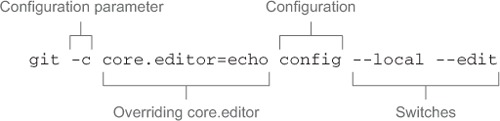
You use the -c switch and an argument to that switch (core.editor=echo). In Git, the -c switch causes Git to override core.editor with the supplied value from the command line. In the case of the git config command, the name of the configuration file is passed to the core.editor, and since core.editor is set to the echo command, the resulting git config command prints the name of the file.