concept remote repository in category git

This is an excerpt from Manning's book Git in Practice.
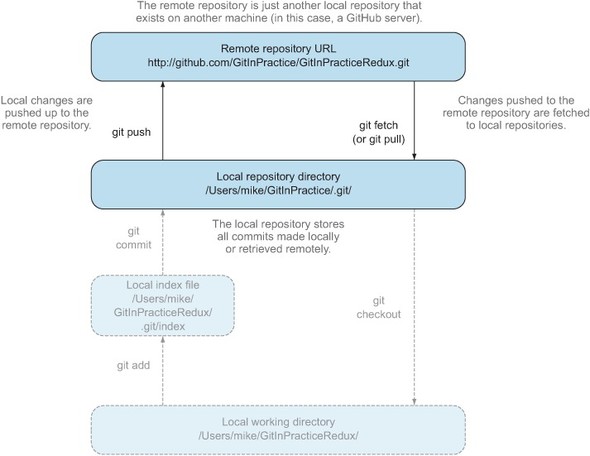
Figure 2.2 shows the remote Git cycle we’ll look at in this chapter. As in the local workflow, files are modified, are added, are committed, and can be checked out. But there are now two repositories: a local repository and a remote repository.
If your local repository needs to send data to or receive data from a repository on another machine, it will need to add a remote repository. A remote repository is one that’s typically stored on another computer. git push sends your new commits to it, and git fetch retrieves from it any new commits made by others.
In technique 1, you created a local repository on your machine. Please sign up for a GitHub account and create a remote repository on GitHub (detailed in appendix B). You can use another Git hosting provider, but this book will assume the use of GitHub (because it’s the most widely used).